I built an AI assistant that ships my blog posts. It writes the MDX, generates hero images, uploads them to a CDN, commits to git, opens pull requests, and merges them — all from a Discord conversation on my phone.
The assistant is called Hermes. It runs on an AWS EC2 instance with a persistent EBS volume, communicates through Discord, and has full access to my portfolio site repository. The stack is Hermes Agent + OpenTofu + Tailscale + Bunny CDN + OpenRouter.
This post covers the exact workflow Hermes uses to take a blog post from idea to production on zackproser.com.
The workflow
It starts with a message in Discord. I describe what I want — the topic, angle, any specific points to cover. Sometimes I'm on my phone, sometimes at my desk. Doesn't matter. Hermes picks it up and gets to work.
Writing the content
Hermes writes the MDX content directly, following the writing rules defined in my repository's CLAUDE.md file. Those rules are strict: no buzzwords, no throat-clearing transitions, no "this isn't X, it's Y" patterns. Direct, matter-of-fact prose. First person where appropriate. Lead with the point, not the setup.
The content lands in src/content/blog/{slug}/page.mdx with the standard imports — next/image, createMetadata, and the metadata.json sidecar file that holds the title, author, date, description, hero image URL, and tags.
Generating hero images
Hermes generates hero images using nano-banana-pro, which wraps the Gemini 3 Pro Image API. The command looks like this:
uv run generate_image.py --prompt "a developer's AI assistant shipping code from a terminal, cyberpunk style" --resolution 2K
This produces a high-resolution PNG. Hermes then converts it to WebP for smaller file sizes and uploads it to Bunny CDN via their storage API. The final URL follows the pattern https://zackproser.b-cdn.net/images/{name}.webp.
The image generation happens on the same EC2 instance where Hermes runs. No separate service, no queue, no Lambda. Just a Python script called from the shell.
Git operations
With the content written and the hero image uploaded, Hermes creates a new branch from origin/main:
git checkout -b blog/how-my-ai-assistant-ships-blog-posts origin/main
It stages the new files, commits with a descriptive message, and pushes to the remote. Then it opens a pull request using the gh CLI:
gh pr create --title "Add blog post: How My AI Assistant Ships Blog Posts" --body "New blog post about the Hermes blog shipping workflow"
Once the PR is open, Vercel picks it up automatically and deploys a preview build.
Review and iteration
I review the preview on my phone. The Vercel preview URL gives me the exact rendering — layout, images, typography, everything. If something needs to change, I tell Hermes in Discord.
"Swap the hero image for something with more contrast."
"Fix the second paragraph — it's too long."
"Move the architecture diagram higher."
Hermes makes the changes, commits, and pushes. The preview updates. This loop is fast because there's no context switching. I stay in Discord, Hermes stays in the repo. No IDE, no local dev environment on my end.
OG image generation
Once the content is finalized, Hermes generates the Open Graph image. This requires a running Next.js dev server because the OG image generator renders the actual page layout:
npm run dev &
npm run og:generate-for -- --slug how-my-ai-assistant-ships-blog-posts
The script captures the OG-formatted screenshot and saves it as a PNG. Hermes uploads the OG image to Bunny CDN at the path images/og-images/{slug}.png.
Merging
When everything looks good, Hermes merges the PR:
gh pr merge --squash --admin
The --admin flag bypasses branch protection rules. This is intentional — Hermes has already verified the build passes, the preview looks correct, and I've approved the content. Adding a manual approval step in GitHub would just slow things down without adding value.
Vercel deploys the production build. The post is live.
Architecture
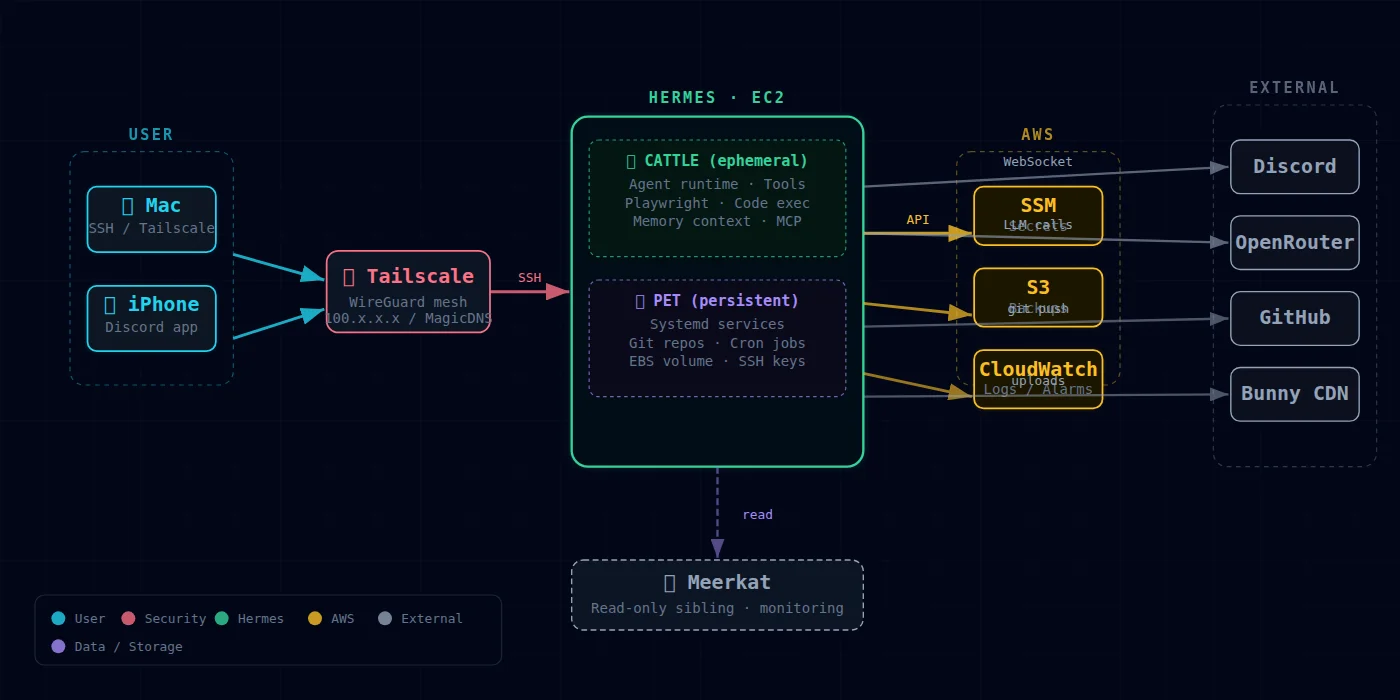
Hermes runs on an EC2 instance provisioned with OpenTofu. The instance has a persistent EBS volume that survives restarts, so the repo clone, credentials, and local state persist across sessions. Tailscale provides secure networking without exposing any ports to the public internet.
The agent communicates exclusively through Discord. I send messages, Hermes processes them, executes tool calls against the filesystem and shell, and responds with results. The LLM inference happens via OpenRouter, which routes to whatever model I've configured — currently Claude for writing tasks.
The tool surface is broad: file read/write, shell command execution, image generation, HTTP requests, git operations. Hermes can do anything I could do if I were SSH'd into the box.
What this gets me
I shipped two blog posts in the same session where I developed this workflow. One about the always-on infrastructure setup, and this one you're reading now. Both went through the full cycle — content written, images generated, PRs opened, previews reviewed, OG images created, PRs merged.
The time from "I want to write about X" to a live post on production is about 30-45 minutes, depending on how many revision cycles the images and content go through. Most of that time is me reviewing previews and deciding what to change.
I don't open my laptop for any of this. The entire authoring and publishing pipeline runs through Discord messages on my phone. Hermes handles every mechanical step — writing files, running commands, managing git state, uploading assets.
The other half of the picture is Claude Code, which I run via --remote-control from my phone. Claude Code handles all the infrastructure work — upgrading Hermes itself, managing OpenTofu deployments, rotating secrets in SSM, debugging cloud-init issues, porting skills from my old assistant. It talks to Hermes through a webhook bridge I built, so the two agents coordinate without me having to relay messages between them.
So the split is: Discord for directing Hermes on content work. Claude Code remote control for infrastructure and system upgrades. Both from my phone. Between the two, I can manage the entire stack — blog posts, images, deployments, agent configuration — without sitting down at a desk.
This setup also means I can ship posts from anywhere. Waiting in line. On a walk. The barrier to publishing went from "sit down at my desk, open VS Code, write, generate images, commit, push, check the preview, fix things, push again, merge" to "tell Hermes what I want in Discord."
Why this works
This workflow looks like magic if you just see the end result. It's worth explaining why it works, because it's standing on years of deliberate infrastructure investment.
I've been building zackproser.com as a Next.js site for years. In that time I've built and refined a specific set of subsystems that an AI can now leverage:
The OG image pipeline. I wrote a custom OG image generator that spins up a local Next.js dev server, renders the page's metadata into a branded 1200×630 template, and exports a PNG. The script checks Bunny CDN first to avoid regenerating images that already exist, accepts --slug for targeted generation, and handles the upload. That took weeks of iteration to get right — the layout, the fallback logic, the CDN integration. Hermes calls one command and gets a production-ready social sharing image.
The Bunny CDN image pipeline. Every image on the site is served from CDN. I have a storage API key, a consistent URL pattern (images/{name}.webp for hero images, images/og-images/{slug}.png for OG), and a WebP conversion workflow. Hermes uploads via curl to the storage endpoint and verifies with a HEAD request. The convention was already in place — Hermes just follows it.
The CLAUDE.md writing contract. My repo has a CLAUDE.md file that encodes my writing style as machine-readable rules. Banned words, banned sentence patterns, voice guidelines, formatting conventions. Every AI that touches this repo reads that file and follows it. I spent months refining those rules by catching AI-isms in my own drafts and encoding the fixes. Now Hermes writes in my voice because the voice is specified, not because the model guessed correctly.
The MDX content structure. Every blog post follows the same pattern: a directory with metadata.json and page.mdx. The metadata drives the title rendering, OG generation, sitemap inclusion, and RSS feed. The MDX supports React components like <Image> and <GitHubRepoCard>. That structure was a deliberate design choice years ago. It's what makes the whole thing scriptable — Hermes can create a complete, valid blog post by writing two files to predictable paths.
The pre-push validation. Scripts for affiliate content validation, metadata fixups, and build checks were already there. Hermes runs them as part of the workflow. I didn't build those for the AI — I built them for myself. But the fact that quality gates exist as shell commands means an AI can run them too.
The AI is the last layer. It's powerful, but it's powerful because it's operating on a codebase that was already designed to be automated. If my portfolio were a WordPress site with a visual editor and images stored in the database, none of this would work. The years I spent making the publishing pipeline code-driven and convention-heavy are what made it possible for an AI to drive it end to end.
The stack
| Component | Role |
|---|---|
| Hermes Agent | AI assistant with shell/file/git access |
| AWS EC2 + EBS | Persistent compute and storage |
| OpenTofu | Infrastructure provisioning |
| Tailscale | Secure networking |
| Discord | Communication interface |
| OpenRouter | LLM inference routing |
| Bunny CDN | Image hosting and delivery |
| nano-banana-pro | Image generation (Gemini 3 Pro) |
| Vercel | Build previews and production deploys |
| gh CLI | Pull request management |
The whole thing is a loop: I describe what I want, Hermes builds it, I review it, Hermes iterates, and eventually it ships. No CI/CD pipeline to configure for the content itself. No CMS. No admin panel. Just a conversation with an AI that has the right tools and the right access.

Discussion
Giscus