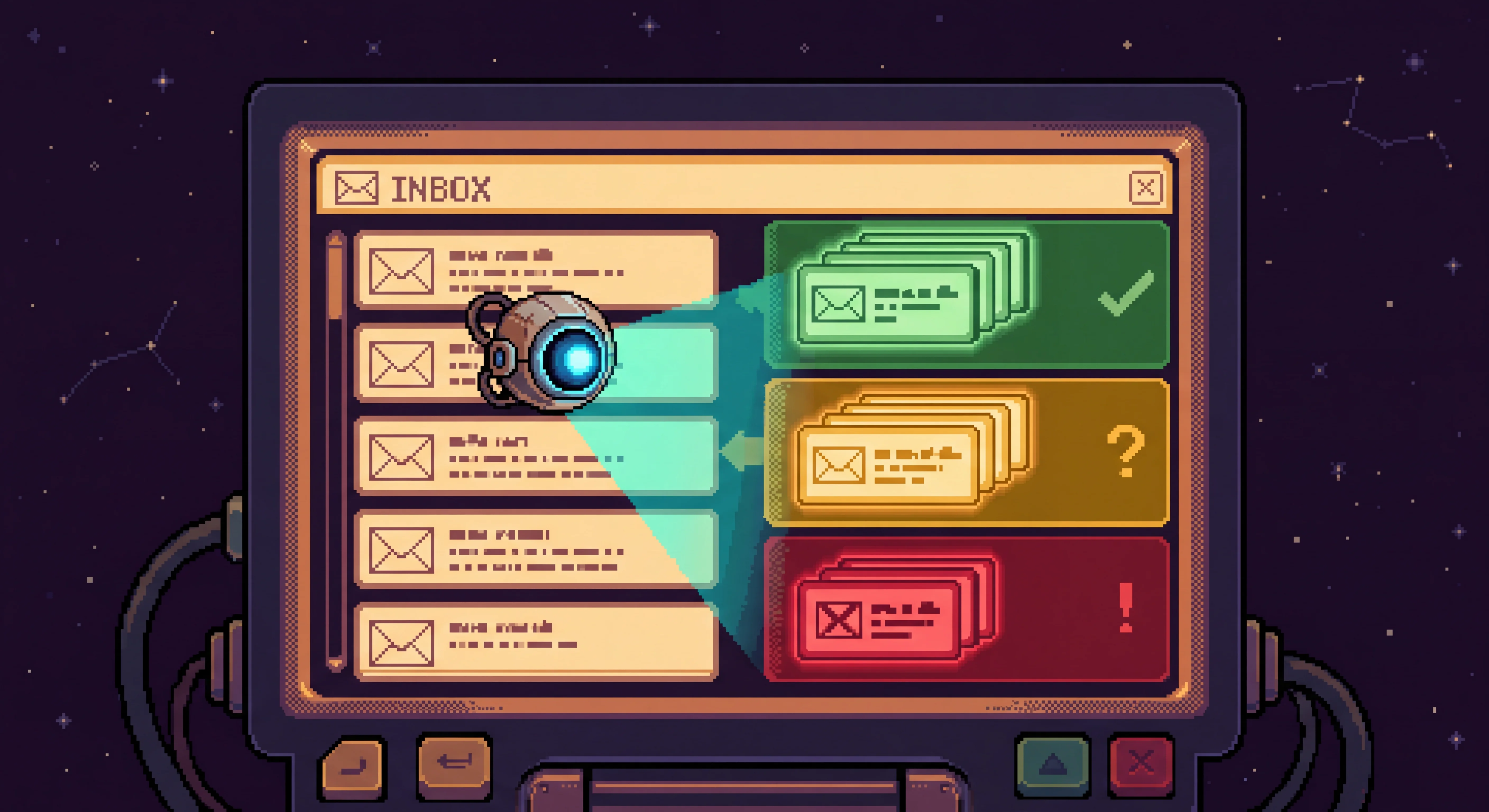
If you publish anything on the internet long enough, you start getting a particular kind of email. The sender knows your name but not your work. The ask is small but generic. The signature is friendly. The Calendly link is already attached.
I get maybe forty of these a week now, spread across half a dozen categories — sponsor pitches, link-exchange wraps, recruiter outreach, expert-network calls, the occasional cold founder pitch. Triaging them isn't hard. The act of switching from real work to writing "thanks but no" in someone else's preferred tone, repeatedly, is the expensive thing.
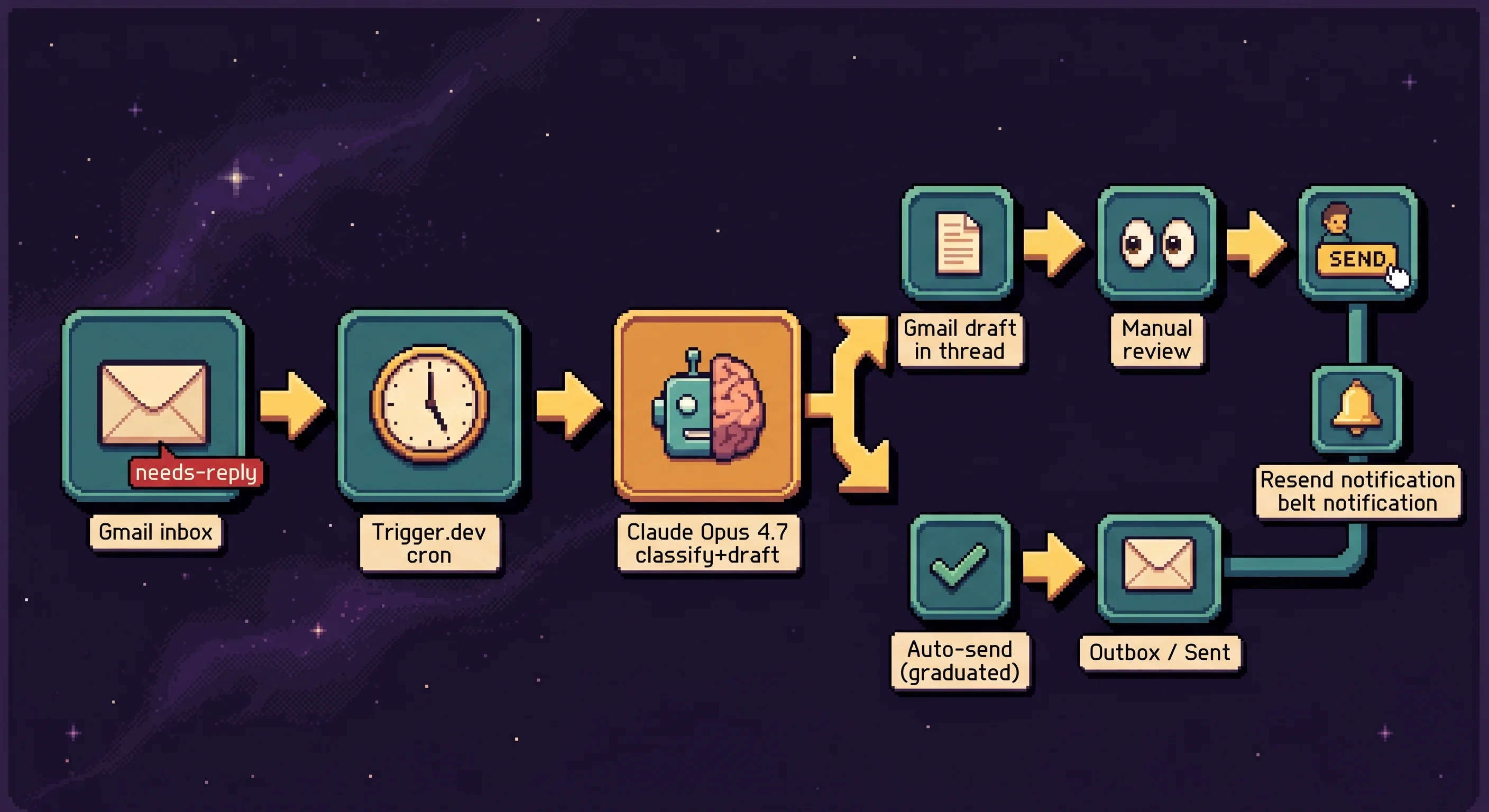
What I wanted was a system that would draft the right reply, in my voice, and drop it into the original Gmail thread. What I didn't want was anything that could send the wrong reply under my name to a stranger I'd never met before. So I built the in-between version: AI drafts every reply, the draft lands in the Gmail thread as a draft, I glance and click Send. After a category accumulates enough verified-correct drafts, that specific category graduates to auto-send. Per-category. Reversible with one env var.
This is how it's wired, what I got wrong on the way, and where it goes from here.

The graduation ladder
For the first stretch I ran everything manually. The classifier produced a draft, the draft sat in the original Gmail thread, I reviewed it and clicked Send. While doing that I kept a calibration log — a short note per draft about whether the category was right, whether the voice landed, whether the prompt needed a rule added for the edge case I just hit.
A category becomes a candidate for auto-send after roughly ten drafts I would have sent verbatim. Not "would have sent after a tweak" — verbatim. At that point the voice rules for the category get pinned: the phrasings that worked, the hard rules ("never offer a meeting time," "never quote a rate inline"), the things to never include. The expert-call category, for instance, picked up a hard rule that the reply must not contain a generic "I'm participating as an individual practitioner, not speaking for my employer" disclaimer. That kind of compliance hedge is actively wrong for the kind of calls I take — they're paying for an actual perspective, not a watered-down version of one.
When a category clears the bar, one env var change opts it into auto-send. Other categories stay in manual mode until they earn their way over. The reversion is the same env var edited back the other way and a redeploy.
Every classification fires a preview email into my inbox — original sender + subject, assigned category and fit score, one-line reasoning, proposed reply in a highlighted block. I open it, glance at the draft, jump to the Gmail thread, click Send. Maybe ten seconds per email.
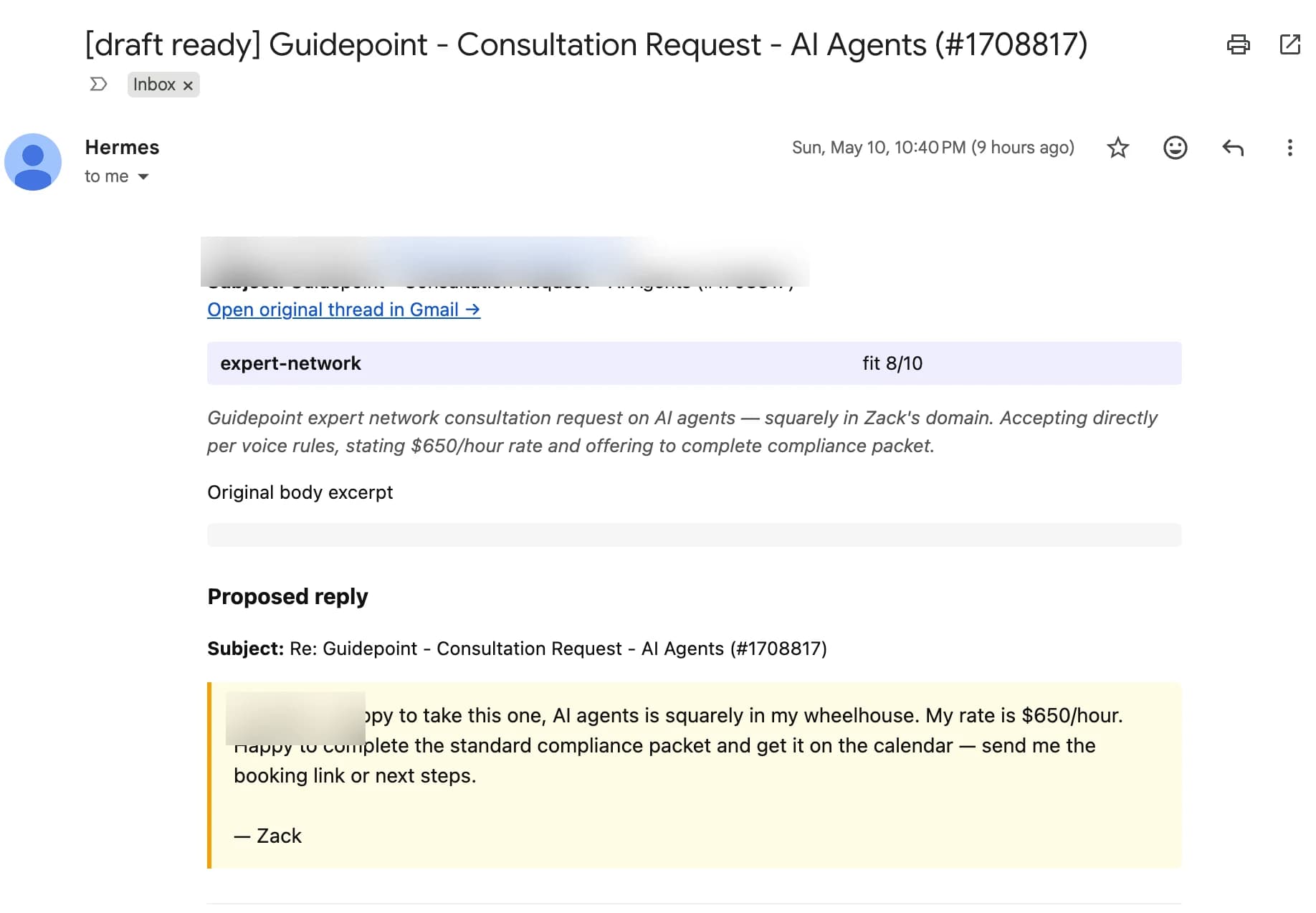
After enough drafts I'd have sent verbatim, the category graduates. Until then, every reply has a human gate.
Wiring Gmail into Trigger.dev
OAuth for Gmail is the messiest part of this stack. Most pieces have a docs page; this one has folklore.
OAuth client type: Desktop App
The other choice — Web application — wants a hosted callback URL like https://myapp.ngrok.io/callback. Fine if you're running a web app. A scheduled Trigger.dev worker doesn't have one. Desktop clients accept http://localhost:<port> as a valid callback, which works from a one-shot local script. Less infra.
Consent screen
External / Testing mode, with myself as the only test user. Google requires verification only if you publish to the public — for a single-user setup, testing mode is fine indefinitely.
Scopes, in two stages
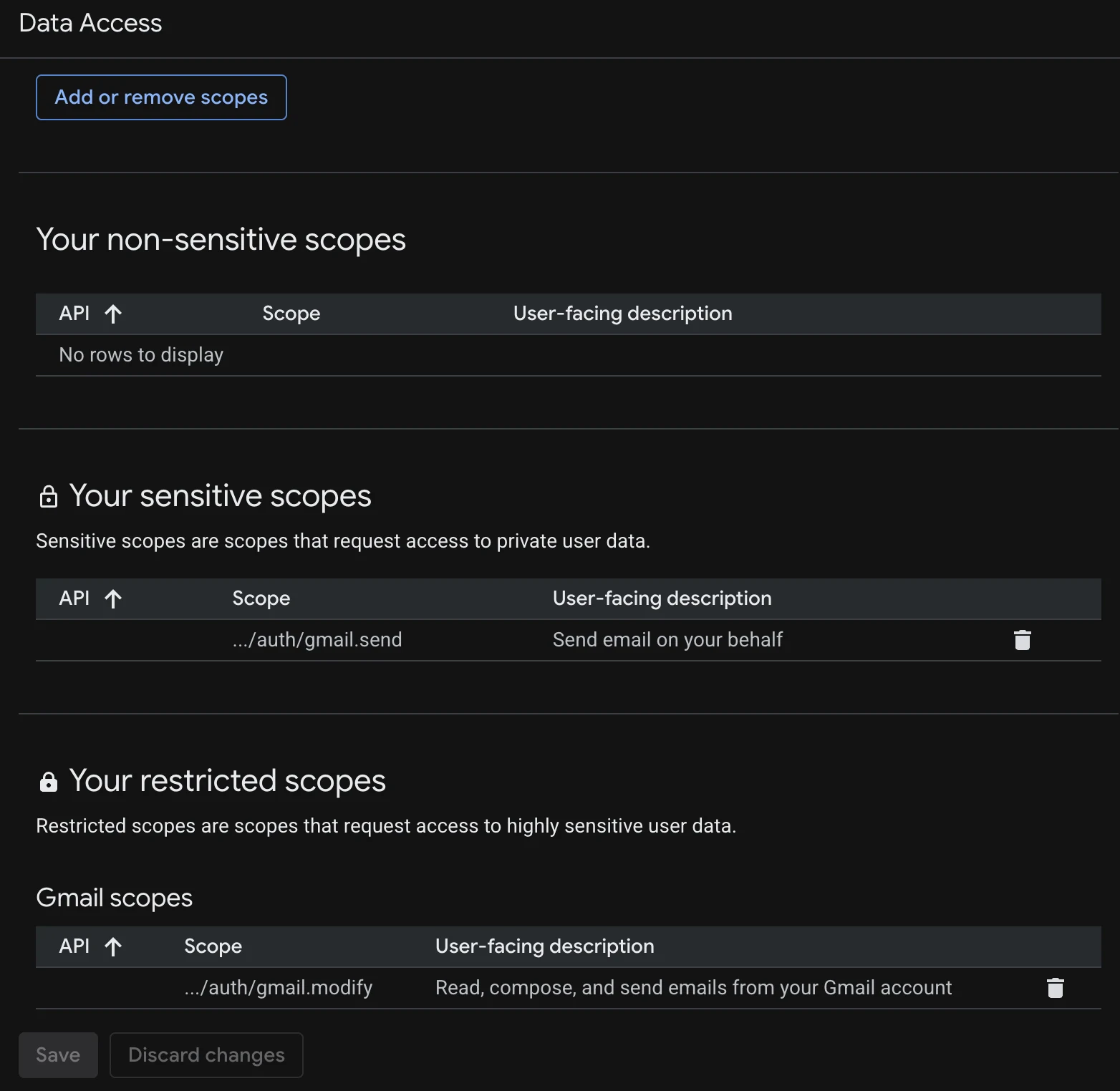
Two scopes, granted in sequence rather than upfront:
https://www.googleapis.com/auth/gmail.modify— read messages, manage labels, create draftshttps://www.googleapis.com/auth/gmail.send— only added when I promoted the first category to auto-send
The drafts phase works without ever granting send access. You cannot auto-send until you've separately granted that scope. If the scope list is a security boundary, this is a physical enforcement of it.
Both scopes, once granted, appear in the Data Access section of the OAuth consent screen — gmail.send lives under "Your sensitive scopes" and gmail.modify under "Your restricted scopes" (because read-and-write access to all your email is considered restricted, while just-send is merely sensitive — Google's nomenclature, not mine).
The refresh-token wrinkle
Google's refresh tokens are only issued when the auth request passes access_type=offline AND prompt=consent. Miss either and you get an access token that expires in an hour. The scheduled task starts failing silently the next morning; no errors, no alerts, just no progress on the queue.
The localhost callback
A ~50-line Node script that opens the browser, captures the auth code on redirect, exchanges it for tokens, and stashes the refresh token in AWS SSM:
// scripts/get-gmail-refresh-token.mjs
import { OAuth2Client } from "google-auth-library";
import http from "http";
import { execSync } from "child_process";

const CLIENT_ID = process.env.GOOGLE_CLIENT_ID;
const CLIENT_SECRET = process.env.GOOGLE_CLIENT_SECRET;
const PORT = 3030;

const oauthClient = new OAuth2Client(
  CLIENT_ID,
  CLIENT_SECRET,
  `http://localhost:${PORT}`,
);

const authUrl = oauthClient.generateAuthUrl({
  access_type: "offline",
  prompt: "consent",
  scope: [
    "https://www.googleapis.com/auth/gmail.modify",
    "https://www.googleapis.com/auth/gmail.send",
  ],
});

const server = http.createServer(async (req, res) => {
  const code = new URL(req.url, `http://localhost:${PORT}`)
    .searchParams.get("code");
  if (!code) return;
  const { tokens } = await oauthClient.getToken(code);
  // Stash refresh_token in SSM SecureString (omitted for brevity)
  res.end("Token saved. Close this window.");
  server.close();
});

server.listen(PORT, () => execSync(`open "${authUrl}"`));
Run it once, the refresh token lands in SSM, the deploy pulls it at runtime. The script doesn't run again until I add a new scope.
The scheduled task
// trigger/gmail-classify.ts
import { schedules, logger } from "@trigger.dev/sdk";

export const gmailClassifyTask = schedules.task({
  id: "gmail-classify",
  cron: "*/5 * * * *",
  maxDuration: 600,
  // googleapis is huge — small-1x (0.5GB) OOMs on cold start before any
  // work runs. medium-1x (2GB) is the smallest preset with reliable
  // headroom for googleapis + anthropic + resend in one bundle.
  machine: { preset: "medium-1x" },
  run: async (payload) => {
    const messages = await gmailListLabeled({
      include: "claude/needs-reply",
      exclude: ["claude/drafted", "claude/sent", "claude/processing", "claude/error"],
      maxResults: 10,
    });
    for (const ref of messages) {
      try {
        await gmailAddLabel(ref.id, "claude/processing"); // lock
        const message = await gmailGetMessage(ref.id);
        const classification = await classifyAndDraft({ /* ... */ });
        // draft / auto-send / label-swap — see below
      } catch (err) {
        await gmailAddLabel(ref.id, "claude/error");
      }
    }
  },
});
Gmail labels are the state store. No database. claude/needs-reply is the trigger label I (or a Gmail filter) apply to anything I want triaged. claude/processing is the lock the task applies while it's mid-flight. claude/drafted or claude/sent is the terminal state. claude/error flags anything that blew up. Re-runs are idempotent because the search query excludes the terminal-state labels.

syncEnvVars: the env-var sync that I assumed deploy was already doing
npx trigger.dev deploy --env-file .env looks like it's syncing your environment variables to the deployed task. It is not. The --env-file flag loads vars into the local CLI process during the deploy. To actually push them to Trigger.dev's encrypted vault you need the syncEnvVars build extension wired into trigger.config.ts:
// trigger.config.ts
import { defineConfig } from "@trigger.dev/sdk";
import { syncEnvVars } from "@trigger.dev/build/extensions/core";

const RUNTIME_ENV_VAR_NAMES = [
  "ANTHROPIC_API_KEY",
  "RESEND_API_KEY",
  "GOOGLE_CLIENT_ID",
  "GOOGLE_CLIENT_SECRET",
  "GOOGLE_REFRESH_TOKEN",
  "AUTO_SEND_CATEGORIES",
] as const;

export default defineConfig({
  project: "proj_...",
  build: {
    extensions: [
      syncEnvVars(async () => {
        const out: Record<string, string> = {};
        for (const name of RUNTIME_ENV_VAR_NAMES) {
          const v = process.env[name];
          if (v) out[name] = v;
        }
        return out;
      }),
    ],
  },
});
Without this extension, the deploy succeeds and the task runs with an empty environment. The runtime error is the kind that takes longer to find than to fix, because the deploy command's success output gives you no reason to suspect anything went wrong.
The Anthropic call
// lib/classify.ts
const response = await client.messages.create({
  model: "claude-opus-4-7",
  max_tokens: 2048,
  system: SYSTEM_PROMPT,
  messages: [{
    role: "user",
    content: `INBOUND EMAIL:
From: ${input.from}
Subject: ${input.subject}

${input.body.slice(0, 4000)}

Respond ONLY with the JSON object specified in the system prompt — no preamble, no markdown fences.`,
  }],
});

const text = response.content
  .filter((c) => c.type === "text")
  .map((c) => c.text)
  .join("")
  .trim()
  .replace(/^```(?:json)?\s*/i, "")
  .replace(/\s*```$/i, "");

const parsed = JSON.parse(text);
validateClassification(parsed);
The shape that comes back looks like this — a real example for an inbound that scored well on the alphasights-intro category:
{
  "category": "alphasights-intro",
  "fit_score": 8,
  "reasoning": "Standard expert-network outreach about applied AI engineering — matches my actual domain. Hand-drafted; warmer tone.",
  "reply_subject": "Re: Quick question on RAG architecture for an AI Coding Agents project",
  "reply_body": "Hi Maria — yes, this is squarely in my wheelhouse and I'd be glad to take the call. My rate is $650/hour. Happy to complete the standard compliance packet and get it on the calendar — send me the booking link or next steps.\n\n— Zack"
}
Every downstream step — label routing, draft body, audit log — reads from this same parsed object. If a prompt change accidentally renames a field, validateClassification throws on the bad shape on the next run rather than letting silently-wrong objects propagate. That runtime check has caught at least one drift already.
The system prompt is a TypeScript string export, not a markdown file. Originally it was a .md loaded with fs.readFileSync. Trigger.dev's bundler doesn't include arbitrary file types in the deploy bundle, so the first run threw ENOENT and stayed broken until I moved the prompt into a .ts export. A parallel .md version of the same content lives in the repo for diff-friendly review, but the runtime source of truth is the TypeScript file.
The strip-and-parse pattern handles the case where Claude returns the JSON wrapped in code fences. Sometimes it does, sometimes it doesn't. Both parse cleanly after the regex cleanups.
The Gmail draft, in the original thread
// lib/gmail.ts
export async function gmailCreateDraft(input) {
  const headerLines = [
    `To: ${input.to}`,
    `Subject: ${input.subject}`,
    "MIME-Version: 1.0",
    "Content-Type: text/plain; charset=UTF-8",
    `In-Reply-To: ${input.inReplyTo}`,
    `References: ${input.references}`,
  ];
  const raw = headerLines.join("\r\n") + "\r\n\r\n" + input.body;
  const rawBase64 = Buffer.from(raw, "utf-8").toString("base64url");
  const res = await gmail.users.drafts.create({
    userId: "me",
    requestBody: {
      message: { threadId: input.threadId, raw: rawBase64 },
    },
  });
  return { id: res.data.id };
}
threadId plus In-Reply-To and References headers are what make Gmail thread the draft cleanly. When I open the conversation, the draft is attached to it — not floating as a new email I have to find. The Gmail UI handles the "this is a reply" visual treatment automatically.
Auto-send, gated per category
// trigger/gmail-classify.ts (inside the run loop)
const AUTO_SEND_CATEGORIES = new Set(
  (process.env.AUTO_SEND_CATEGORIES ?? "")
    .split(",")
    .map((s) => s.trim().toLowerCase())
    .filter(Boolean),
);

// Never auto-send these, regardless of env.
const AUTO_SEND_DISQUALIFIED = new Set([
  "expert-network-followup",
  "noise",
]);

const shouldAutoSend =
  hasReply &&
  AUTO_SEND_CATEGORIES.has(category) &&
  !AUTO_SEND_DISQUALIFIED.has(category);

if (shouldAutoSend) {
  await gmailSendDraft(draftId); // gmail.users.drafts.send
  await gmailAddLabel(ref.id, "claude/sent"); // distinct from claude/drafted
}
A few things this block is doing on purpose:
Per-category opt-in. Nothing auto-sends unless its category is listed in the env var. The first two categories I promoted: expert-network call requests and AlphaSights-style intros. The response shape on those is well-defined enough — "yes, $650/hour, send the booking link" — that I trust the system not to embarrass me.
Hard-coded disqualifications. Some categories never auto-send no matter what the env var says. expert-network-followup covers post-call payment forms and W-9 chasers, where the action belongs to me and there's no reply to draft. noise covers automated newsletters and do-not-reply addresses. The hard-coded set is a safety net for a config typo that promotes a category that should never have been a candidate.
Kill switch. Setting AUTO_SEND_CATEGORIES= (empty) reverts every category back to manual draft mode on the next cron tick.
Different label. Auto-sent messages get claude/sent. Drafts get claude/drafted. Reviewing the audit trail later is one Gmail filter.
Belt notification. The system also sends me a brief Resend email confirming the auto-send. Even when I trust the category, I want to see every outgoing in real-time, so I can intervene immediately if something looks off.
Four things I got wrong on the way
OOM on the default Trigger.dev machine. The small-1x preset (0.5GB) crashed on cold start before any work ran. The googleapis library is massive — even with tree-shaking it pulls in code for every Google service. Bumping to medium-1x (2GB) was the fix. The crash was silent in the sense that the cron just stopped advancing; I had to dig through the dashboard run history to spot the OOM.
data vs payload on Resend events. I posted custom data under {event, email, data: {...}} and the API returned 202. Looked fine. Except data is the wrong field name — Resend's /events/send accepts custom payload under payload. The 202 was Resend silently discarding my custom data, and an automation that was supposed to branch on payload.source started misfiring. One field-name fix; Cursor Bugbot caught it in code review.
The bundler doesn't include .md files. Already mentioned this one above, but it's worth re-flagging: when you deploy to a remote bundler, only the JavaScript/TypeScript graph ships. Anything you load via fs.readFileSync from outside that graph isn't there at runtime. The fix is to make the asset part of the import graph — for a prompt, a .ts export.
Assuming --env-file syncs the vault. Covered above; this one cost about half an hour.
Where it goes from here
The first two categories that graduated to auto-send: alphasights-intro and expert-network. Expert-call requests from research firms. The response is always some flavor of "yes, $650/hour, here's my availability, send the booking link." Calibrated enough.
Next up:
- The polite-no categories.
partnership-fit-low(link exchanges, irrelevant sponsor pitches),recruiter-low-comp(engineering recruiter below my comp bar),recruiter-devrel(not interested),recruiter-irrelevant(engineering outside my domain). All have well-defined response templates and minimal nuance. Once each has ten verified drafts on its calibration log, it graduates. - A public
contact@address. Right now the classifier only sees email I receive at my personal Gmail and label myself. The next move is a publiccontact@zackproser.comaddress routed through a Cloudflare Email Worker into the same Trigger.dev pipeline. Same classifier, same safety architecture, new input source. - A smaller model on the calibration corpus. Every confirmed-correct draft is in the calibration log. That corpus could fine-tune a cheaper model down the road. Not a priority — Opus token costs are well below my coffee budget at current volume — but the data is being collected in case it becomes one.
The thing I keep coming back to: inbox automation works when you give it a narrow definition of "what looks correct" and a clear path to escalate when something doesn't match. Wide-open auto-reply is the failure mode. A graduation ladder is the version that earns trust.

Discussion
Giscus