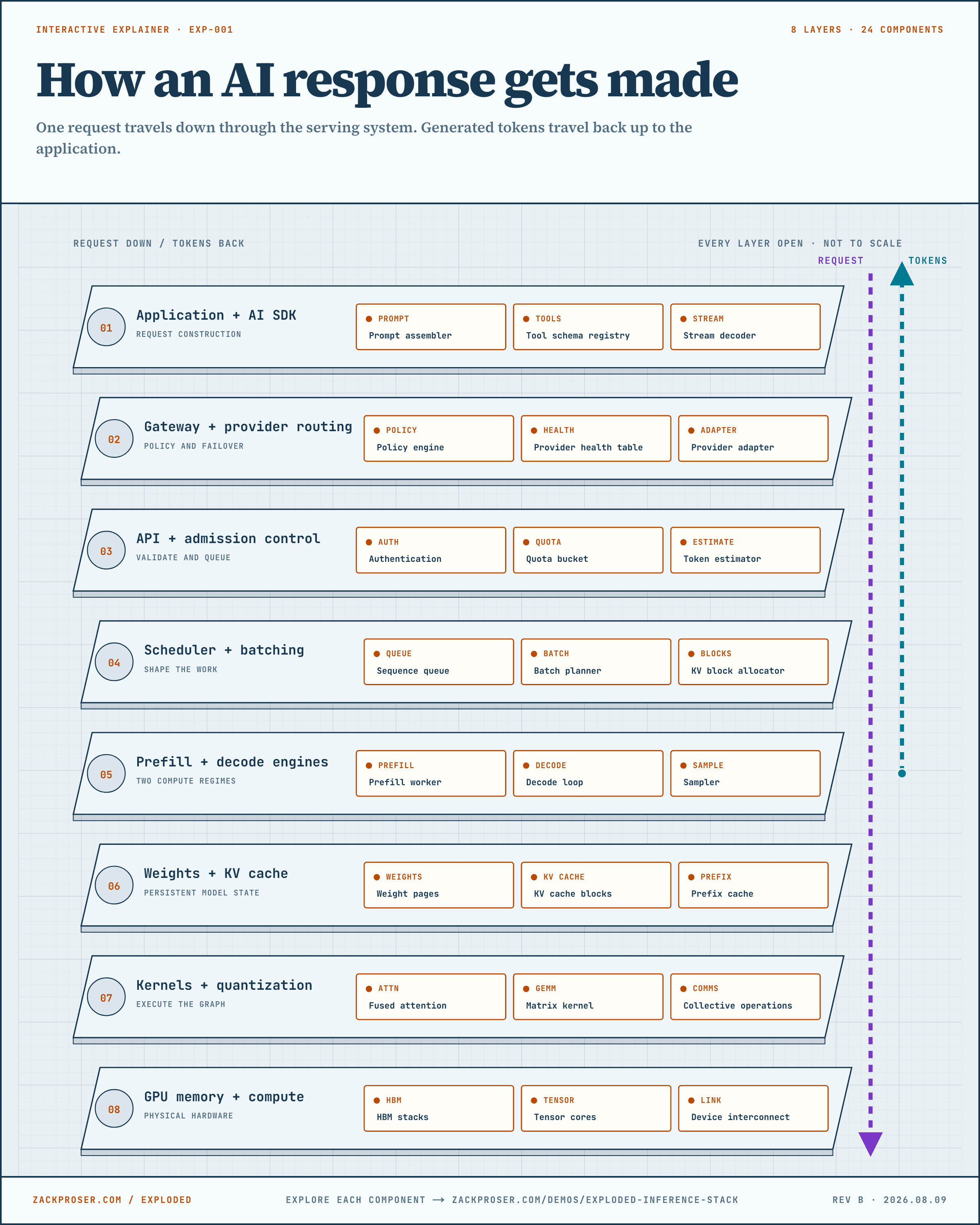
The application gathers the text, instructions, and available tools the model needs.
The chat box becomes a request the server can read. It names the model, orders the messages, describes any tools, sets rules for choosing words, and asks the server to return text as it is generated.
- Primary budget
- input tokens
- 01INSTRUCTIONS
- 02HISTORY
- 03CONTEXT
- 04REQUEST
- 05PROMPT
Prompt assembler
Reading the animation: Four labeled segments—Instructions, History, Context, and Request—slide together and leave as one prompt.
Combines the instructions, earlier messages, reference material, and the user’s latest request.
Four inputs become one ordered prompt
system: Answer for a beginner. | history: 2 messages | context: DNS notes | user: Why cache DNS?- Instructions
- Answer for a beginner.
- History
- the previous two messages
- Reference context
- retrieved DNS notes
- Latest request
- Why cache DNS?
- Output
- one ordered model message list
This step orders the messages, removes text that will not fit, and keeps repeated instructions stable so the server may reuse earlier work.
In engineering terms: Engineers call this prompt assembly. The finished prompt is the complete, ordered text the model receives for this turn.
FOLLOW THIS EXAMPLE
- 01
Place system instructions before the conversation they govern.
- 02
Append earlier messages and any retrieved reference material in a stable order.
- 03
Add the latest request, count the tokens, and trim lower-priority material if the prompt is too large.
- 04
Send one ordered message list to the model endpoint.
Measurements, controls, and tradeoff
- Useful evidence
- Input-token count, context-window use, truncated messages, and prompt-cache hits.
- Controls
- Message order, retrieval limits, history compression, and which stable prefixes appear first.
- Tradeoff
- More context can improve the answer while increasing cost, first-token delay, and the chance that useful instructions become buried.
- Output
- ordered messages
Definitions and sources
TERMS IN THIS VIEW
- Prompt
- The full input sent to the model, including instructions, conversation history, retrieved material, and the latest request.
- Token
- A small unit of text the model reads or writes. A token can be a whole word, part of a word, punctuation, or whitespace.
- Context window
- The maximum amount of text a model can consider in one request, measured in tokens.
- Prefix cache
- Saved attention state for an input prefix shared by later requests, such as a repeated system instruction.
SOURCES + CONTINUE READING
Why it matters: The amount and arrangement of input text affect cost, speed, and how much room remains in the model’s context window.
Definitions for this layer
TERMS IN THIS VIEW
- Token
- A small unit of text the model reads or writes. A token can be a whole word, part of a word, punctuation, or whitespace.
- Prompt
- The full input sent to the model, including instructions, conversation history, retrieved material, and the latest request.
- AI SDK
- A software development kit: reusable code that helps an application format model requests, stream responses, and call tools.
- Tool schema
- A structured description of a function the model may call, including its name, purpose, and accepted arguments.
Show 2 more definitions
- Streaming
- Returning a response in small pieces as they are generated so the user can begin reading before the full response is complete.
- Context window
- The maximum amount of text a model can consider in one request, measured in tokens.