
Granola and Jamie both capture meetings without joining as a visible bot. That makes many older comparisons wrong before they begin. Jamie is a desktop and mobile meeting assistant that works across online platforms and in-person conversations. Granola is also cross-platform at the meeting level and centers the experience on a note you can influence while the conversation is happening.
The choice is subtle: Jamie is stronger when you want automatic structured notes, broad language support, speaker memory, and conventional business integrations. Granola is my pick when a few cues I type should steer the final note and I want that editable document to be the center of the workflow.
The short answer
| Question | Granola | Jamie |
|---|---|---|
| Joins as a meeting bot | No | No |
| Online meeting coverage | Captures microphone and system audio through its desktop app | Advertises support across online platforms through its app |
| In-person capture | Mobile app | Mobile app |
| Human notes influence output | Yes; typed cues feed the enhanced note | Automatic notes and custom templates are the main path |
| Speaker handling | Desktop transcript commonly distinguishes “Me” and “Them” | Speaker recognition and memory are advertised |
| Saved audio | Granola says it does not retain meeting audio | Jamie says audio is deleted after transcription |
| Best fit | Editable, note-first personal workflow | Automatic notes, languages, integrations, and speaker memory |
Both are reasonable products. The test should be how much work remains between the generated output and the artifact you actually send, save, or turn into a task.
Reading on your phone? Save my referral link for your Mac or Windows computer.
The Granola workflow
Granola opens a note from your calendar or lets you start an unscheduled one. The desktop app captures microphone and system audio, sends the audio stream to cloud transcription providers, and combines the transcript with calendar context and whatever you typed. The result is an enhanced note you can edit before sharing.
I like being able to add sparse cues during a call. A line such as “this is the hidden dependency” tells the later document what I considered important. I do not have to write a parallel transcript, but I can still exercise judgment while the context is fresh.
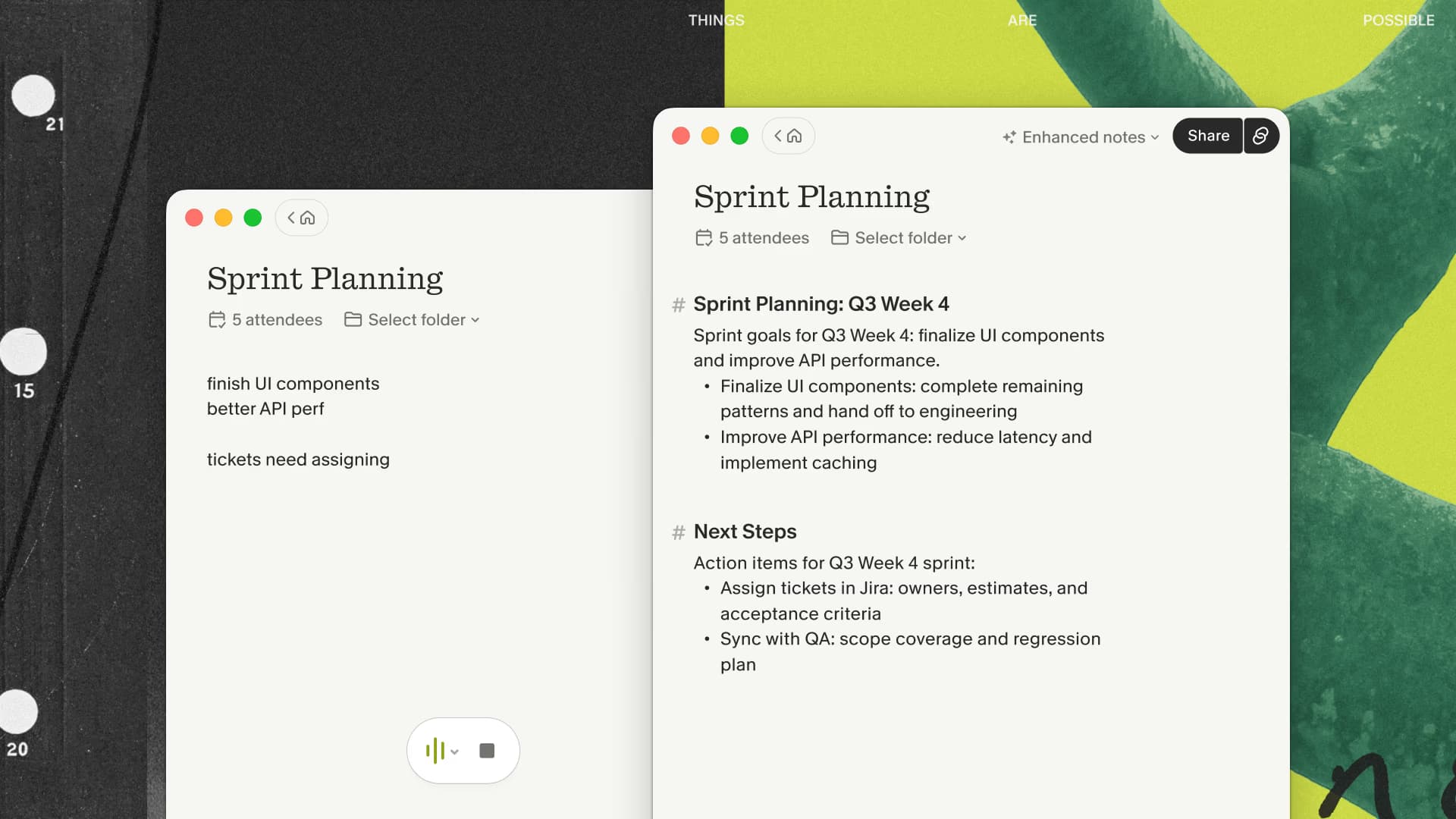
The limits are part of the product decision. Granola does not keep a replayable audio recording. Its app runs on the device, but transcription and note generation are cloud-assisted. Capture also needs to be started for the meeting; “no bot” does not mean an invisible service attends every calendar event automatically.
If you already jot down the moments that matter, try shaping a real Granola note with those cues. My link gives a new user three months to see whether that habit improves the finished recap.
The Jamie workflow
Jamie also runs without a bot and advertises support for all online meeting platforms plus in-person meetings. It produces notes, transcripts, task detection, and an Ask Jamie chat experience. Its current plan comparison lists notes and transcripts in more than 99 languages, speaker recognition and memory, custom templates, and integrations that expand on higher tiers.
The integration list is a meaningful reason to choose it. The current pricing page names Google Docs, Notion, and OneNote on lower plans, then adds products such as Asana, Salesforce, HubSpot, Attio, Affinity, Microsoft Dynamics 365, DealCloud, and Pipedrive on higher plans. Jamie also lists API, webhook, and MCP access on eligible tiers.
Jamie says its infrastructure is hosted in the EU, that it does not train models on customer data, and that audio is deleted after transcription. Those are useful facts for a security review, but they do not substitute for checking the contract, retention settings, and exact plan a team will use.
Note quality is a workflow question
It is tempting to declare one summary “better” after reading two polished examples. That test is too easy. A useful note has to preserve the decision, the reason behind it, the owner, the deadline, and any uncertainty that should remain visible.
Granola's advantage for me is editorial direction. The rough cues I type during a meeting survive into the enhancement process, which helps the output reflect why the conversation mattered. Jamie's advantage is automation: the product is designed to create a structured result without requiring that light note-taking habit.
Use a scoring sheet on a normal meeting rather than an artificial benchmark. Count factual corrections, missing owners, invented certainty, and minutes until the note is ready to share. If you never type cues during meetings, Granola's distinguishing interaction may matter less. If generic summaries repeatedly miss the point you noticed in the room, it may matter a great deal.
Pricing and plan limits in 2026
Granola currently lists Basic at $0, Business at $14 per user per month, and Enterprise at $35 per user per month. Business includes unlimited meeting notes and history, advanced AI features, integrations, MCP, and API access. New users who sign up through my affiliate link receive the separate three-month benefit.
Jamie currently lists a free personal plan with 10 meetings per month and a 30-minute meeting limit. With annual billing selected, Plus is shown at €21 per month for 20 meetings and a two-hour limit, while Pro is €39 per month for unlimited meetings and a three-hour limit. The comparison table shows different monthly prices, so check the billing toggle before comparing totals.
The free plans make a real test possible. Pay attention to meeting-duration limits and integrations, because those can decide the practical cost before the headline monthly price does.
Privacy, capture, and consent
Neither product sends a named bot into the participant list. That removes admission friction, but the underlying audio still goes through a service for transcription. Participants should know when that is happening, and a company should decide who may capture which meetings.
For Granola, the relevant questions include cloud transcription providers, retained transcripts and notes, sharing, and deletion. For Jamie, include EU hosting, audio deletion after transcription, workspace access, integrations, and retention controls. Regulated or confidential teams should verify current documentation and contract terms for their chosen plan.
Bot-free is an interface and architecture choice. It is not a privacy verdict by itself.
Which one should you choose?
Choose Granola when you want an editable private note, type occasional cues during calls, and expect the note to feed writing or decisions afterward. Skip it when replayable audio, automatic speaker names for every person, or importing an old recording is essential.
Choose Jamie when you want bot-free automatic notes, more explicit speaker-memory features, extensive language coverage, or one of its business integrations. Check its plan limits carefully if you have long or frequent meetings.
A good same-meeting test is simple:
- Pick a recurring, permitted call with two or three speakers.
- Use the same microphone and take only two short cues in Granola.
- Let Jamie produce its normal automatic result on a comparable session.
- Correct names, numbers, decisions, owners, and deadlines.
- Time how long each result takes to become the actual recap or task list.
For the cue-driven side of the test, start Granola through my three-month link; choose Jamie instead if automation, languages, or its integrations win on your real meetings.
My recommendation
Jamie is no longer the server-side bot described by older pages. It is a credible bot-free alternative with broad language and integration support. My own preference remains Granola because I want a working document that reflects the signals I noticed during the call.
For a comparison with a transcript-led Chrome workflow, read Granola vs Tactiq. For the broader product experience, see my Granola review.

Discussion
Giscus