
The useful difference between Granola and Fireflies is no longer “bot-free versus bot.” Fireflies now offers several capture methods, including a desktop app and Chrome extension that can record supported calls without its bot. Granola has always captured microphone and system audio from the user's device.
The products still feel very different. Granola is an AI notepad built around the private, editable document one person produces. Fireflies is a broader meeting system built around transcripts, recordings, shared workspaces, integrations, search, and team analysis.
The short answer
| Question | Granola | Fireflies.ai |
|---|---|---|
| Primary artifact | Editable meeting note | Transcript and recording library with derived notes |
| Capture choices | Desktop microphone and system audio; mobile in-person capture | Bot, desktop app, mobile app, Chrome extension, and file uploads |
| Bot required | No | No; it remains one of several options |
| Saved audio or video | Granola says it does not retain meeting audio | Recording and video storage depend on mode and plan |
| Human notes shape output | Yes | Not the central interaction |
| Team operations | Sharing, folders, Spaces, Chat, and integrations | Channels, comments, analytics, AI skills, integrations, admin controls |
| Best first test | A personal decision record or client recap | A team call that needs replay, search, distribution, or analysis |
Choose Granola when the note is the thing you need. Choose Fireflies when the meeting record needs to serve several people or automated systems.
Granola's note-first workflow
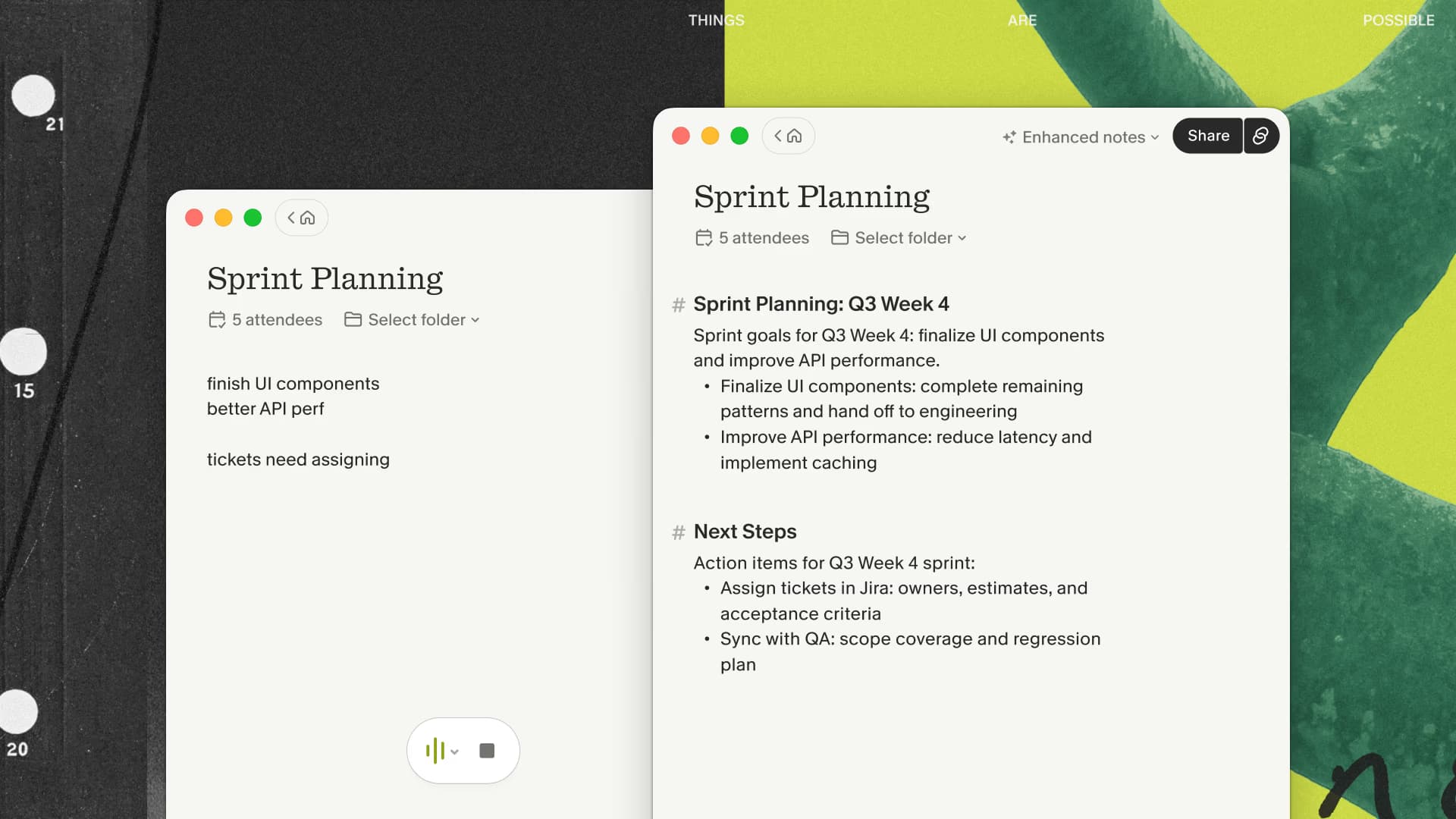
Granola opens from the calendar or as an unscheduled note. The desktop app captures microphone and system audio, sends the stream to cloud transcription providers, and creates an enhanced note using the transcript, calendar context, and any cues typed during the conversation.
That last input is the reason I use it. I can type a fragment such as “this changes the launch order” while continuing to listen. The enhancement keeps my signal and fills in the supporting detail. Afterward I verify facts and edit the document before it becomes a recap, decision record, or source for later work.
Granola says it does not retain meeting audio, so the note and transcript are the lasting artifacts. That keeps the product focused, but it also removes replay. A team that needs to hear tone, review a sales call, or cut a clip should start elsewhere.
If your meetings end in written decisions rather than replay, test Granola's note workflow with three months free on one representative call before introducing a shared recording system.
Fireflies' meeting-system workflow
Fireflies offers more ways to get a conversation into the system. Its notetaker can join popular conferencing platforms. Its desktop and mobile apps cover device and in-person capture. Its Chrome extension supports bot-free recording, and users can upload existing audio or video files.
After capture, Fireflies provides transcripts, summaries, action items, AskFred, meeting search, comments, clips, channels, integrations, and conversation intelligence. Current plans advertise transcription in more than 100 languages. Business and enterprise tiers add administration and analysis features that are meant for an organization, rather than one person's notebook.
That breadth is a strength when meetings are operational data. A sales leader can review calls, a customer team can search recurring objections, and an administrator can define access or retention. It is extra surface area when all you wanted was a clean private recap.
Bot-free does not make the products equivalent
Fireflies' newer device and extension capture make old comparisons unfair. It can keep a bot out of the attendee list. Granola and Fireflies still differ in what happens after that capture.
Granola expects the user to own and edit a note. Fireflies expects a meeting record to live in a workspace where it can be replayed, searched, shared, analyzed, and connected to other systems. Even when both start on the same laptop, one is closer to a writing surface and the other to a conversation database.
The distinction also affects failure modes. With Granola, verify that capture started, the correct input and output were available, and important facts survived enhancement. With Fireflies, verify the intended capture mode, storage behavior, workspace access, and whether the recording or transcript was distributed as expected.
Pricing and storage change the calculation
Granola currently lists Basic at $0, Business at $14 per user per month, and Enterprise at $35 per user per month. Business includes unlimited meeting notes and history, advanced features, integrations, MCP, and API access. My link adds a separate three-month benefit for new users.
With annual billing selected, Fireflies currently lists Free at $0, Pro at $10 per seat per month, Business at $19, and Enterprise at $39. Its free plan advertises unlimited transcription and AI summaries with 400 minutes of team storage. Pro raises storage to 8,000 minutes per seat and adds recordings, downloads, and integrations. Business advertises unlimited storage plus conversation intelligence and team analytics.
Those storage numbers explain much of the product difference. Granola's durable object is text. Fireflies has plans for storing and working with a media archive. Compare the tier containing the feature you need rather than the cheapest logos on the pricing pages.
Privacy and governance
A visible Fireflies bot can make capture obvious, while device and browser modes need another disclosure method. Granola also requires the user to handle disclosure. In either case, “bot-free” says nothing about whether transcription is appropriate for the conversation.
Fireflies' larger archive creates more governance questions: who can open recordings, which integrations receive data, what is downloaded, and when media is deleted. Its current pricing page lists SOC 2 Type II and GDPR across plans, with HIPAA, SSO, SCIM, private storage, and custom retention on Enterprise.
Granola retains notes and transcripts and uses cloud services for processing, even though it does not retain meeting audio. Teams should review vendor terms, sharing defaults, deletion, integrations, and model-training controls for their exact plan.
Which product fits your workflow?
Choose Granola if you want to stay present, type a handful of cues, edit the result privately, and share a concise artifact. It is especially sensible when replaying the original conversation has no business value.
Choose Fireflies if several people need a searchable meeting repository, recordings or video matter, old files need to be imported, or CRM automation and conversation analytics justify the extra system.
For an honest evaluation, capture two comparable permitted calls. In Granola, turn the result into the final recap you would send. In Fireflies, test the exact bot, desktop, or extension mode you expect to deploy and ask a colleague to find a moment later. Measure correction time, sharing friction, retrieval, and whether anyone actually uses the stored recording.
When the final recap is the only artifact people consume, use my Granola link for the note-first half of that comparison. It includes the first three months free for a new user.
My recommendation
I use Granola because I normally need a thoughtful note, not a permanent media library. I would choose Fireflies for a sales, recruiting, or customer organization that intends to treat calls as shared operational records. Neither is universally better; the ownership and lifespan of the output decide the choice.
For a recording-centered alternative with video clips, read Granola vs Fathom. For a live transcript in Chrome, see Granola vs Tactiq.

Discussion
Giscus