
Granola and Tactiq can both take notes without sending a bot into the meeting. The experience is quite different. Tactiq puts a live transcript beside a Google Meet, Zoom, or Microsoft Teams call in Chrome. Granola runs as a desktop notepad, captures microphone and system audio, and turns the transcript plus anything you typed into an editable note.
My short answer: choose Tactiq when seeing and working with the live transcript is the priority. Choose Granola when the useful artifact is the note you edit and use after the call.
The decision in one minute
| If you care most about… | Better first test | Why |
|---|---|---|
| A live transcript inside browser meetings | Tactiq | Its Chrome extension shows transcription during supported calls |
| Notes shaped by a few cues you type | Granola | Your notes and the transcript feed the enhanced document |
| No bot in the participant list | Either | Both offer bot-free capture |
| Meetings outside supported browser tabs | Granola | Desktop capture is independent of the conferencing site |
| A low-cost transcript tool | Tactiq | The free plan includes 10 transcripts per month; annual Pro is listed at $8 per user monthly |
| A focused meeting notebook | Granola | The product is organized around editable notes, folders, and later questions |
The distinction is not “basic captions versus intelligent notes.” Tactiq now has AI questions, workflows, summaries, action items, multi-meeting features, and integrations. Granola has also grown beyond a single summary. The better choice comes from where you want to work during the meeting and what you need to keep afterward.
What using Tactiq feels like
Tactiq is a Chrome extension. It supports Google Meet, Zoom, and Microsoft Teams, displays a live transcript, identifies speakers, and lets you ask AI questions or create summaries while the conversation is still fresh. Its current material advertises more than 60 transcription languages and workflow connections including Notion, Slack, Linear, and HubSpot.
That immediacy is its best argument. If somebody gives a number and you want to scan the preceding sentence now, the transcript is already on screen. A researcher can tag a moment, a recruiter can check the wording of an answer, and an attendee who benefits from written reinforcement can follow the conversation in text.
Tactiq says it does not record or store the meeting audio; it saves the transcript as text. It also offers controls to pause transcription and, on paid plans, manage its in-meeting notification. Those controls deserve a real test with your browser profile and company policies before a team adopts it.
The boundary is the browser workflow. Tactiq is a natural fit when your meetings happen in its supported web conferencing apps. A phone call, an in-person conversation, or an unusual desktop call does not fit that extension-centered model as neatly.
What using Granola feels like
Granola begins with a calendar-led note. During a meeting, I can type a few fragments such as “real objection,” “confirm owner,” or “follow up on pricing.” Afterward, Granola uses those cues with the transcript and calendar context to enhance the document. I then correct names and numbers, remove material that should not be shared, and turn the note into the follow-up I actually need.
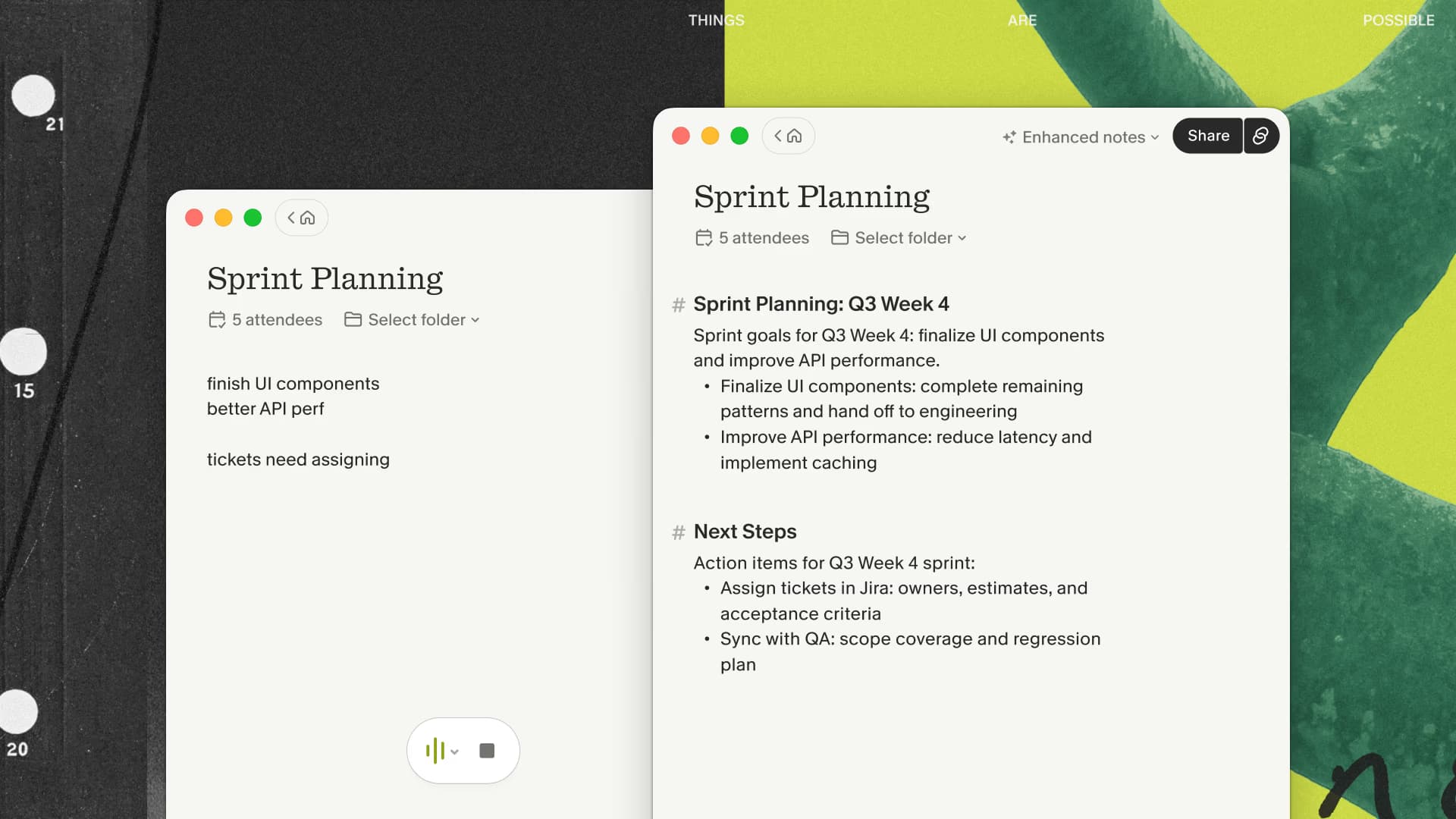
Granola captures microphone and system audio without joining the call. The desktop app is local, while transcription and note generation use cloud services. Granola says it does not retain the meeting audio. That makes the resulting note the durable artifact; there is no original recording to replay later.
This is why I reach for Granola when I want a decision record, client recap, or source material for later writing. I am already working in a document, and my own attention can influence its shape. Someone who needs live words on screen may find that model too quiet.
If your work starts after the call rather than inside a live transcript, try Granola's editable-note workflow with three months free on one ordinary meeting.
Transcript, note, and memory are different jobs
A transcript answers “what words were captured?” A note answers “what mattered and what happens next?” A meeting memory answers “where did we discuss this across several calls?” Both products cover parts of all three jobs, but their interfaces put the emphasis in different places.
Tactiq keeps the transcript close during the call. Its AI features can generate insights, answer saved questions, and operate across meetings. Granola keeps the editable note central, then adds folders, Chat, integrations, and workspace context around it.
Neither approach guarantees accuracy. Names, acronyms, overlapping speakers, poor microphones, and code-switching can trip up any transcription system. I would ignore unsourced percentage claims about one product being universally more accurate. Use the same ordinary meeting, then count the corrections that affect decisions, owners, dates, and quantities.
Current pricing without the old numbers
Tactiq currently lists a free plan with 10 transcripts and 5 AI credits per month. With annual billing, its pricing page lists Pro at $8 per user per month, Team at $16.67, and Business at $29.17. The tiers differ in AI credits, transcript controls, team features, administration, and automation, so the cheapest unlimited-transcript plan may still lack a team feature you expect.
Granola currently lists Basic at $0, Business at $14 per user per month, and Enterprise at $35 per user per month. Business includes unlimited meeting notes and history plus advanced integrations and models. My affiliate benefit is separate: new users who come through my link receive their first three months free.
Prices and limits change. Check both linked pricing pages before buying, especially if you need SSO, retention controls, or centralized administration.
Privacy and consent in practical terms
Both products avoid a named bot in the participant list, but neither makes disclosure optional. The useful questions are concrete: what audio leaves the device, what text is retained, which model providers process it, who can access the note or transcript, and how it can be deleted.
Granola streams audio to cloud transcription providers and retains the transcript and notes rather than the meeting audio. Tactiq states that it transcribes in real time and saves text rather than audio. A security review should use each vendor's current documentation and contract, not labels such as “local-first” or assumptions about Chrome extensions.
For a personal trial, tell participants that transcription is active and use a low-stakes meeting. For a company rollout, involve the people responsible for consent, retention, access, and approved vendors.
Who should choose which product?
Choose Tactiq first if you live in supported meetings inside Chrome, want text during the conversation, and expect the transcript itself to be an active workspace. It is also the more obvious budget test for light use.
Choose Granola first if you move between meeting platforms, want your typed cues to shape the result, and prefer a private draft that becomes a polished note after review. It is a poor fit when you need a replayable audio file or shared live captions.
If both descriptions sound useful, do not compare polished vendor demos. Run one permitted recurring call with each product. Use the same headset and meeting format. Afterward, score capture completeness, important corrections, time to a sendable recap, and whether the output reached the place where the work continues.
You can use my three-month Granola link for the note-led half of that test. Keep Tactiq if seeing the transcript during the call proves more useful.
My recommendation
I would use Tactiq for a transcript-led workflow and Granola for a note-led workflow. My own meetings usually need a concise decision record or follow-up, so Granola's editor is the better fit. Tactiq is the honest recommendation when a live Chrome transcript is the main feature the reader came for.

Discussion
Giscus