
I have used Granola for months across team calls, interviews, and planning meetings. It remains my preferred meeting-notes app because the note is the product. I can type a few signals during a call, stay engaged with the conversation, and review a useful draft afterward.
The short version: Granola is excellent for people who want a private working note without adding a bot participant. It is a weaker fit if you need a recording library, imported audio, a bot that attends without you, or a shared live transcript for everyone on the call.
New users who start with my Granola link get their first three months free. Use that time on several ordinary meetings before deciding whether the paid history and integrations matter; I may earn a commission when someone signs up.
My verdict after daily use
| Question | My answer |
|---|---|
| What is Granola best at? | Turning a meeting plus a few typed notes into a clean, editable draft |
| Does a bot join? | No |
| Is processing fully local? | No. The app captures microphone and system audio on your device, then sends it directly to cloud transcription providers |
| Does Granola save meeting audio? | Granola says it does not save audio; the transcript and notes remain available |
| Does it always start automatically? | No. You usually open the meeting note, click a notification, or create a new note; a note opened before a scheduled meeting can start at the scheduled time |
| Who should skip it? | People who need audio playback, file uploads, unattended meeting capture, or organization-wide transcript workflows |
Reading on your phone? Save my referral link for your Mac or Windows computer.
The distinction between capture and processing matters. Granola runs as an app on your computer and listens to the microphone and system audio. It passes that audio directly to a cloud transcription provider while the meeting is happening. Cloud AI providers then help generate the enhanced note. Describing the whole workflow as “on-device” leaves out the part most readers care about.
Three questions. One honest recommendation.
What the meeting workflow feels like
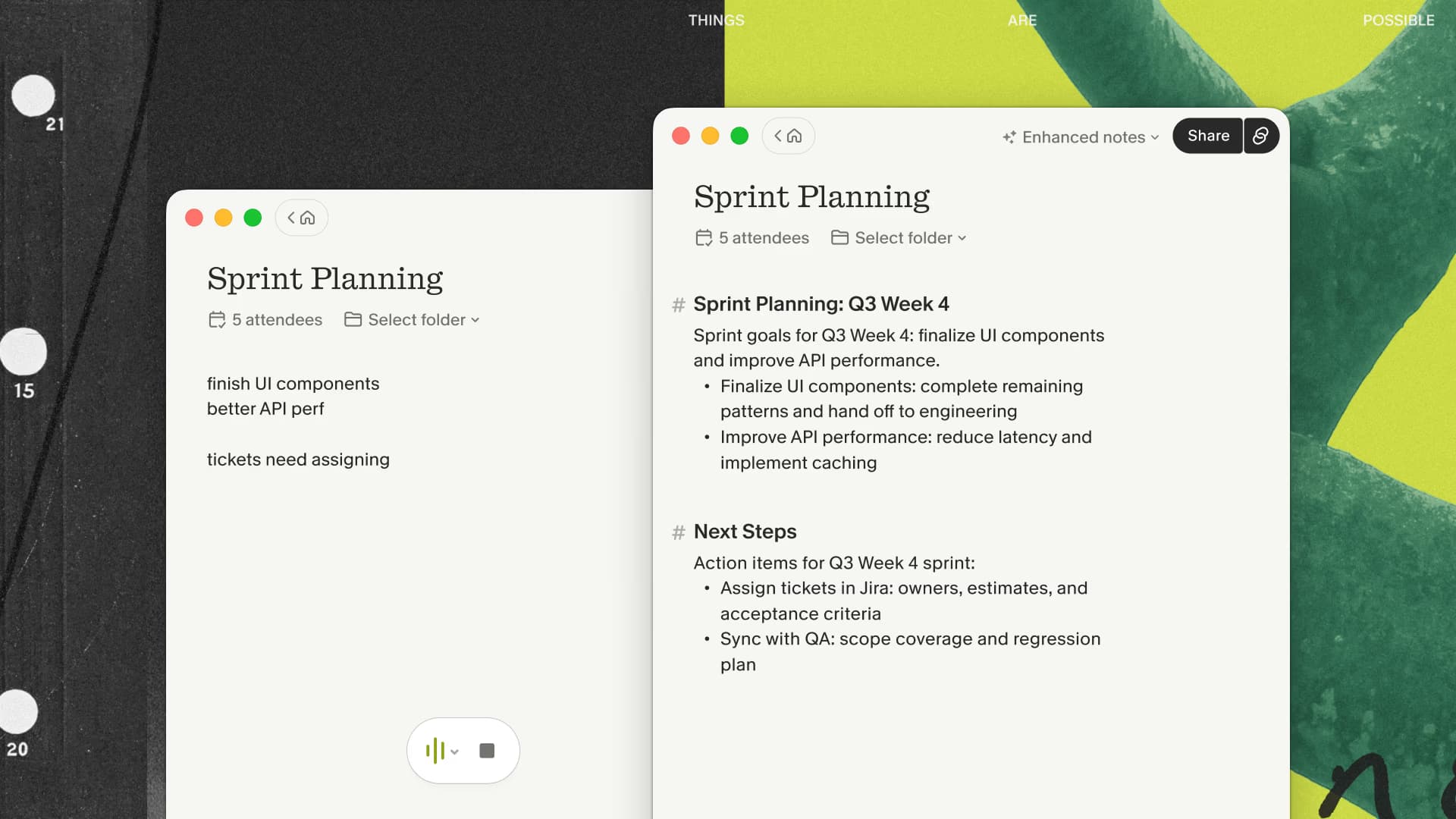
Granola connects to your calendar and creates a note for the meeting. When the call begins, I open that note from the notification or home screen. For an unscheduled conversation, I create a new note manually.
During the meeting, I type only what I want to emphasize: a decision, a number to verify, or a follow-up I own. Granola combines those signals with the transcript when it generates the enhanced note. Leaving the editor blank also works, but a few deliberate notes usually produce a draft that better reflects what mattered to me.
There is no Granola participant in Zoom, Meet, or Teams. That keeps the call roster clean, but it does not make transcription invisible in the ethical sense. I tell people when I am using it and then get on with the meeting.
If that sounds like the kind of meeting you run, try Granola with one routine call from your calendar. Type only two or three cues, then judge how much work the enhanced note still needs.
Try one design-review meeting
Give the first meeting one job: leave with an implementation brief you can review before opening tickets. Use a real design review or project-planning call already on your calendar.
- Open my Granola referral link on your Mac or Windows computer, install the desktop app, and sign in with your work email. Check the offer shown in your account; if it differs from the three months advertised here, contact Granola support before purchasing.
- Tell participants you will use transcription, follow your team's policy, and open the meeting note when the call starts. Check that capture is active. Type a few cues about decisions and unresolved questions.
- After the meeting, review the enhanced note and ask Granola Chat for an implementation brief using the prompt below.
Use only this meeting’s notes and transcript. Draft a concise implementation
brief with decisions, proposed tickets, confirmed owners, delivery dates,
acceptance checks, risks, and open questions. Separate confirmed decisions
from suggestions. Write “not agreed” for missing dates or owners. Do not
invent commitments or fill gaps from other meetings. Keep it under 220 words.
End with the items a human must confirm before creating tickets. If the source
is a fictional sample, label the output as a fictional sample.
Check the decisions against the transcript, then edit the proposed tasks before copying them into your issue tracker. Judge the result by how much clarification and editing it still needs.
Watch the brief take shape
This captioned walkthrough uses fictional notes pasted into Granola Chat, followed by the actual generated result and saved Recipe. It demonstrates transforming notes into a draft; it does not demonstrate live meeting capture or prove transcription accuracy.
Text version of the sample: The fictional Atlas team agreed to retry transient webhook failures with exponential backoff and jitter, capped at five attempts, and to keep an idempotency key per event. Mina owns the retry worker; Theo owns dashboards. No delivery dates were agreed. Permanent 4xx errors must not be retried; rate-limit handling and a dead-letter queue remain unresolved.
What the result showed: Granola kept Mina and Theo as the confirmed owners, labeled dates “not agreed,” and left the dead-letter queue as an open question. It proposed separate idempotency and rate-limit tasks without inventing owners. The acceptance checks cover avoiding duplicate side effects, recovering transient failures, and making exhausted events visible. Those proposed tasks still need human review.
I saved the prompt above as Design review to implementation brief, a single-meeting Recipe. To reuse it, create your own single-meeting Recipe with that prompt and apply it to a permitted meeting. Review the output before creating tickets.
You can later use Granola MCP to bring meeting context into a compatible coding assistant. Start with the reviewed brief; connecting another tool can wait until the output earns its place in your workflow.
What I genuinely like
The output starts as an editable note
Many meeting tools are organized around a recording or a transcript. Granola starts with a document. That suits my workflow because the useful artifact is usually a decision record, a follow-up email, or a list of open questions.
The generated draft is easy to reshape. I can change the template, edit a claim, add context that was never spoken, and remove material that should not travel beyond the meeting.
My own notes influence the result
The text I type during a meeting is treated as context rather than a separate scratchpad. This is the feature that keeps Granola from feeling like a generic summarizer. A short note such as “verify the launch date” helps steer the final draft toward the point I need to revisit.
It stays out of the call roster
A visible bot can be useful: everyone knows what joined, and some bots can attend when their owner cannot. I rarely need that. For the smaller meetings I attend myself, I prefer a desktop note that captures the audio already playing through my computer.
There is no audio archive to manage
Granola says meeting audio is passed to its transcription provider and is not recorded or saved. I usually want the transcript and the edited note, so the lack of audio playback is acceptable. Anyone who needs to review the original recording should choose a tool built around saved audio or video.
The limitations I notice
Starting and stopping still need attention
Granola does not transcribe every calendar event in the background. I need to open the note or respond to the notification. If I open an upcoming note before its scheduled start, transcription can begin automatically at the meeting time.
The app can detect when many calls end, although that is not foolproof. Back-to-back meetings, continued microphone use, and managed computers can require a manual stop. I check the indicator when a meeting starts and stop the note when the conversation ends.
The transcript depends on the audio path
Granola captures the combined system-audio stream rather than isolated tracks from every meeting participant. Music, notification sounds, or the wrong audio device can affect the transcript. Speaker tags also depend on the platform and setup. I treat names, numbers, and commitments as details to verify.
It needs the cloud
The desktop app is local, while transcription and note generation rely on cloud providers. Teams with data-residency, retention, or regulated-data requirements should evaluate the documented architecture and their own policy before adoption.
It is not an audio-file transcription service
Granola is designed for live meetings. It does not import an MP3 from an old interview or give me an audio recording to replay later. Otter, Fathom, and other recording-centered products cover those jobs better.
My practical workflow
Before a recurring meeting, I choose a narrow template instead of asking for every possible detail. A project review might need decisions, risks, owners, and dates. A discovery call might need the buyer’s current process, constraints, objections, and next step.
During the call, I type sparingly. Afterward, I spend two or three minutes on four checks:
- Verify names, numbers, dates, and commitments against the transcript.
- Remove confident language the conversation did not support.
- Add context that was visible in the room but absent from the audio.
- Send only the sections the recipient needs.
That review is essential. Granola gives me a strong draft; it does not decide what happened or what I should promise.
Granola or another meeting tool?
Choose Granola when you attend your own meetings, prefer an editable note, and want to keep a bot out of the participant list.
Choose Otter when you need a shared transcript, live collaboration, saved recordings, uploads, CRM workflows, or the option to send a Notetaker to a meeting. Otter also offers bot-free desktop capture now, so “no bot” is no longer a Granola-only feature.
Choose Notion AI Meeting Notes when the meeting artifact should live directly beside your team’s projects and documents. Choose Fathom when a call recording and video library are central to the workflow.
Choose Read AI when playback, coaching, participant analytics, file uploads, or an assistant that can attend supported meetings matters more than a minimal note editor. The Granola vs Read AI comparison covers its separate bot and desktop-capture modes. For Notion, Slack, CRM, Zapier, MCP, and API handoffs, use the Granola integrations guide.
If none of those recording or unattended-attendance requirements apply, compare Granola's edited note with your current follow-up. The better test is saved cleanup time, not the number of features in the app.
Is Granola worth trying?
Yes, if your problem is divided attention during meetings rather than a missing recording archive. The free plan is enough to test the real workflow. Use it on several ordinary, low-risk meetings and judge the edited notes, not the novelty of the first transcript.

Discussion
Giscus