
Granola is useful on a discovery call for one simple reason: you can listen to the buyer instead of trying to produce a transcript in real time. It captures the conversation, combines it with the notes you type, and generates a structured draft after the call.
The product still needs judgment. It will not qualify a deal for you, decide whether a prospect is serious, or replace the fields your sales team requires in its CRM. The useful version of this workflow keeps Granola focused on capture and recall while the salesperson owns interpretation.
What Granola actually does during a sales call
Granola opens a note from the calendar event and captures audio on your device without sending a visible bot participant into the call. The desktop app passes microphone and system audio to cloud transcription providers, then uses cloud AI providers to generate enhanced notes. You can leave the editor blank, but a few short notes help direct the generated result. Granola treats the details you type as important context when it creates the enhanced notes.
After the meeting, its draft draws from three sources: the transcript, your raw notes, and the calendar event. You can inspect where a generated point came from, edit the result, apply a different template, or ask Granola Chat a follow-up question.
| Granola handles | You still handle |
|---|---|
| Capturing and transcribing the conversation | Asking useful discovery questions |
| Turning rough notes into a structured draft | Deciding whether a statement is a buying signal |
| Pulling out decisions and next steps when prompted | Confirming the next step with the buyer |
| Sending notes to supported tools | Keeping required CRM fields accurate |
That division of labor matters. Treating an AI note-taker as an autonomous sales analyst produces confident-looking records that can still be wrong.
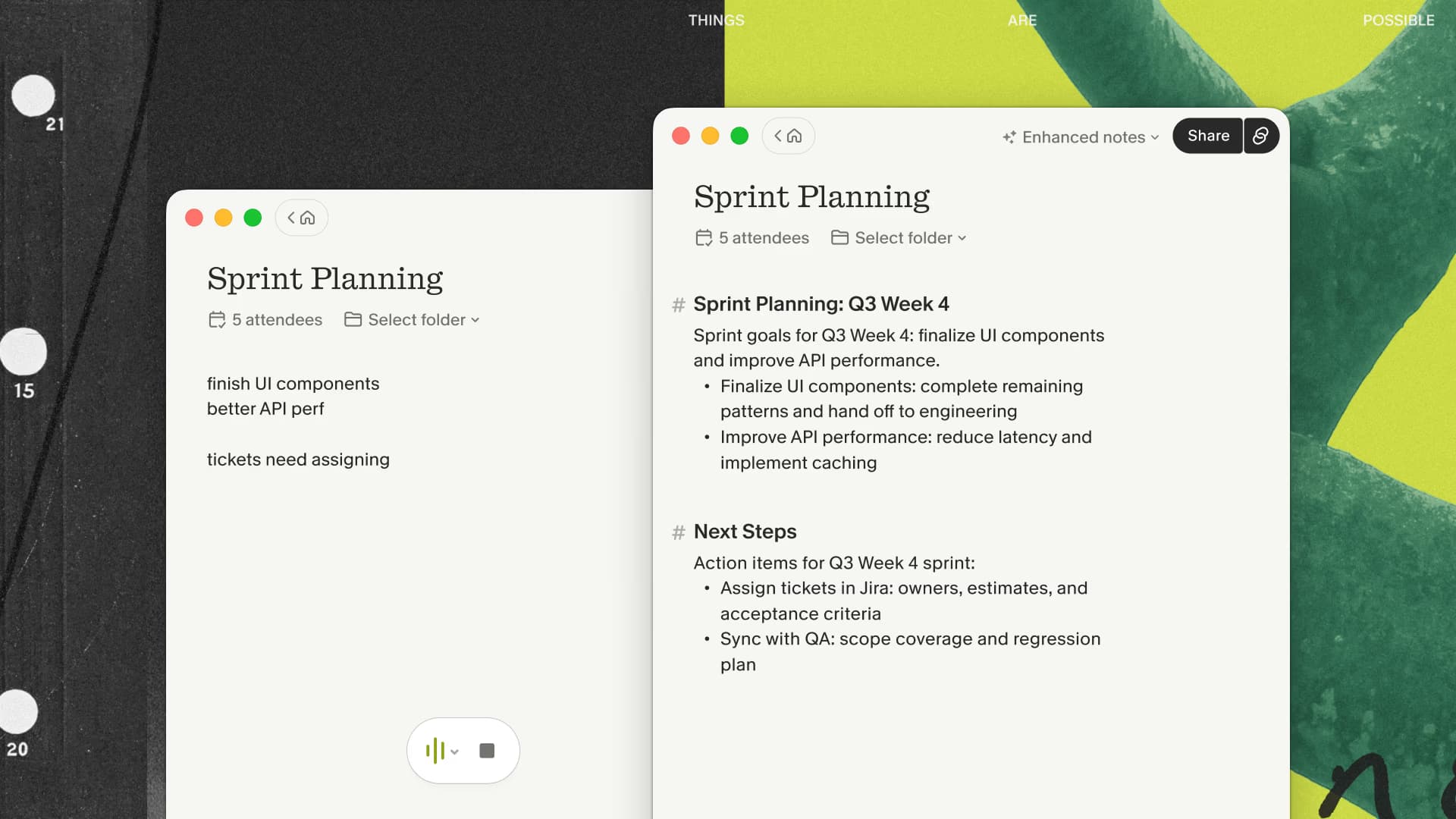
If that division sounds right, test Granola on one routine discovery call and compare how much attention and follow-up time it returns.
Build one discovery template before the call
Granola includes templates for common meeting types and lets desktop users create their own. A useful discovery template should match the questions your team actually reviews after a call.
Here is a compact starting point:
Purpose: Summarize this client discovery call for the account team.

Capture:
- The problem in the buyer's own words
- Current process or workaround
- Business impact and urgency
- Constraints, objections, and unanswered questions
- People involved in the decision
- Dates, numbers, and direct quotes worth checking
- Agreed next step, owner, and due date

Do not infer budget, authority, or purchase intent when the buyer did not state it.
Mark uncertain details as needing confirmation.
The final two instructions are important. They keep the summary from turning ordinary conversation into invented qualification data.
Use your notes as signals, not a second transcript
Typing full sentences during the meeting recreates the original problem. I would keep raw notes short and selective:
pricing concern — ask about approval pathcurrent workaround takes 4 hrs/weekSam owns security reviewfollow up Friday with API example
Those fragments tell Granola what deserves attention while leaving you free to continue the conversation. Headings can also steer the result. If the discussion changes direction, add a heading such as # Security requirements or # Rollout timing and keep listening.
For sensitive calls, tell the other participants how notes are being captured and follow company policy, client agreements, and applicable law. A meeting assistant that does not appear as a participant still captures audio.
Review the draft before it reaches the CRM
The first post-call pass should take a few minutes. Check names, dates, commercial terms, technical requirements, and the exact next step. Granola lets you inspect the transcript context behind an enhanced note, which is useful when a sentence sounds more certain than the conversation did.
Then reduce the output to what the account team needs:
- Keep the buyer's stated problem and its impact.
- Separate facts from your interpretation.
- Assign an owner and date to every next step.
- Move unresolved questions into the follow-up plan.
- Copy only verified details into CRM fields.
This review is where the notes become useful sales material. The generated draft saves recall and formatting time; the salesperson supplies accuracy and context.
If the reviewed draft reaches a useful follow-up faster than your current process, keep testing Granola across several discovery calls before changing the team's CRM workflow.
Send the result where the team already works
Granola's current integrations include HubSpot, Attio, and Affinity for matching notes to CRM records. It also supports Notion, Slack, and Zapier. Zapier can connect the note payload to Salesforce and other systems when a native connection is unavailable. Business and Enterprise plans have API access for custom workflows.
Do not promise automatic CRM hygiene until you have tested your specific fields and permissions. A practical rollout starts with one meeting type, one template, and one destination. Review ten calls before expanding it across the team.
Shared folders can help managers and account teams review related conversations. Granola Chat can also search a set of meeting notes for repeated questions or open tasks. Those features are better suited to finding patterns than asking a single call summary to predict a deal.
When another meeting tool is a better fit
Granola is strongest when presence, private working notes, and a bot-free call are the priority. Choose another approach when your hard requirement is live captions, a shared transcript during the meeting, or a sales platform that automatically records every call and fills a prescribed revenue-operations workflow.
It is also a poor fit when company policy prohibits the capture method, the call involves material that should not be sent to an external service, or nobody will review the generated notes before they become account history.
The decision is less about which AI has the longest feature list. Pick the capture behavior and review workflow that your buyers and sales team will accept.
My recommendation
Use Granola for discovery calls if manual note-taking is pulling your attention away from the buyer. Create a narrow template, type only the details you want emphasized, and review every generated claim before it enters the CRM.
Start with the free plan and test it on a few low-risk calls.
New users can use the first three months free through my link, which is enough time to test more than one buyer, call shape, and follow-up path.

Discussion
Giscus