
Choose Granola when you want one personal meeting-note workflow across Zoom, Google Meet, Microsoft Teams, and other desktop calls. Choose Microsoft Copilot when meetings already live inside a managed Microsoft 365 environment and you want notes, transcripts, permissions, and recaps governed there.
There is no credible universal accuracy percentage that settles this comparison. Audio quality, language, speaker behavior, terminology, platform settings, and the meeting itself all affect the result. The useful comparison is how each product captures a meeting and where the output goes.
Quick comparison
| Question | Granola | Microsoft Copilot in Teams |
|---|---|---|
| Where does it work? | Across desktop meeting apps; mobile for in-person capture | Inside Microsoft Teams meetings and calls |
| How is audio captured? | Local app captures microphone and system audio, then sends it to cloud providers | Teams meeting services provide the meeting context and available transcript |
| Does a bot join? | No | No separate notetaker bot |
| Can I type my own notes? | Yes; raw notes influence the enhanced note | Copilot works from Teams meeting context, prompts, and available transcription |
| Post-meeting home | Granola notes, folders, chat, and integrations | Teams Recap, meeting chat, OneDrive, and Microsoft 365 controls |
| Best fit | Individuals and teams using several meeting platforms | Organizations centered on Teams and Microsoft 365 governance |
Capture and start behavior
Granola runs as a desktop client. It captures the user's microphone and system audio without adding a participant to the call. The audio is passed to cloud transcription providers, and transcript plus note context is processed by cloud AI providers. Granola does not retain meeting audio, but it stores transcripts and notes in its US-hosted AWS environment.
Transcription starts after the user interacts with a note: clicking a meeting notification, opening a current meeting, or starting a Quick Note. A note opened before the scheduled start can begin at the calendar start time.
Copilot is native to Teams. Depending on tenant policy and meeting settings, users can ask Copilot questions during a call without starting a saved transcript. Post-meeting Copilot and Recap features require the meeting to have the necessary transcript or recording. Hosts, administrators, licenses, sensitivity labels, and access settings shape what is available.
During the meeting
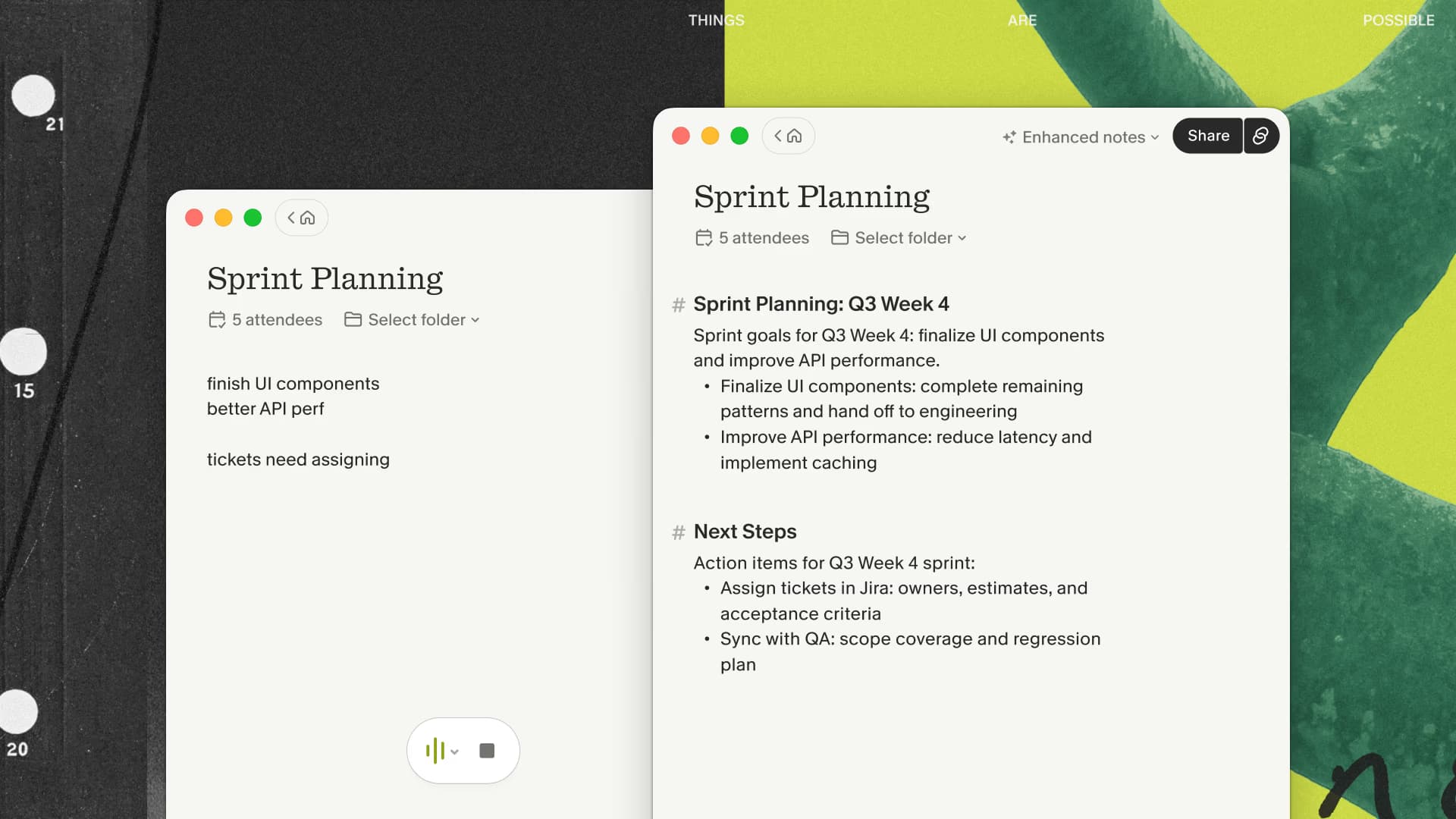
Granola is built around a private working note. I find its useful behavior is the combination of a live transcript, a few notes I type, and an enhanced draft after the call. On desktop, the live transcript currently separates "Me" from "Them" rather than identifying every remote speaker.
Copilot's advantage is participation inside Teams. Eligible users can ask what they missed, request a summary of the discussion, or extract follow-up tasks without leaving the meeting. The experience is stronger when the organization already treats Teams as the system of record for calls and collaboration.
If you want the private document rather than the Teams-native recap, run Granola beside one ordinary Teams call and compare the reviewed outputs afterward.
After the meeting
Granola produces an editable enhanced note based on the transcript, calendar event, and the user's raw notes. Templates can shape the output for one-on-ones, discovery calls, interviews, or other recurring meetings. Notes can be sent to supported destinations including Slack, Notion, CRM systems, Zapier, MCP clients, and the API on eligible plans.
Teams Recap can contain the recording, transcript, shared content, notes, an AI summary, agenda, and follow-up tasks when the required features were enabled. Microsoft warns that AI-generated content can be inaccurate and should be checked. Permissions and sensitivity controls can limit access or sharing.
The difference is ownership. Granola creates a personal cross-platform meeting library. Copilot keeps the meeting record close to the Teams tenant where the event happened.
Privacy and procurement
Both products process meeting data in the cloud. Granola captures audio through the local app and uses named transcription and AI subprocessors. Microsoft processes Copilot and transcript data inside the organization's Microsoft environment and applicable service terms.
For Granola, review its SOC 2 report, US data residency, model-training settings, retention, sharing, and integrations. For Microsoft, review tenant configuration, license eligibility, recording and transcript policy, sensitivity labels, OneDrive retention, and who can use or share Recap.
Participants should be told when a meeting is being transcribed or summarized. A bot-free experience does not remove that responsibility.
Choose Granola when
- you move among Zoom, Meet, Teams, and other call apps;
- you want private notes that combine your typing with a transcript;
- you prefer a dedicated meeting library and flexible templates;
- you want the same capture habit for scheduled and ad-hoc desktop conversations;
- your organization accepts Granola's cloud data path and controls.
When those conditions match, test Granola across the different meeting platforms in your week. Cross-platform consistency is the reason to add it instead of another Teams feature.
Choose Microsoft Copilot when
- most important meetings happen in Teams;
- meeting artifacts should remain under Microsoft 365 administration;
- in-meeting questions and Teams Recap are central to the workflow;
- sensitivity labels, tenant access, and Microsoft retention are requirements;
- the needed Microsoft licenses are already available.
My recommendation
For an individual who joins calls across several platforms, Granola is the simpler daily tool. For a Microsoft-first company with mature Teams governance, Copilot usually creates less administrative sprawl. Test each with the same approved meeting type and review the resulting notes for facts, omissions, and follow-up quality.

Discussion
Giscus