Granola and Notta can both transcribe a meeting without adding a bot, and both now run on Mac and Windows. Older comparisons that describe Granola as Mac-only or Notta as bot-only are out of date.
The useful difference is the artifact you want afterward. Granola is a focused AI notepad: type a few cues, let the transcript supply context, then review an editable note. Notta is a broader recording and transcription suite with live text, saved audio or video, file imports, translation, a meeting bot, and bot-free desktop capture.
I use Granola for my own meetings. I evaluated Notta here against its current product and support documentation rather than pretending I ran a long private benchmark. If a reviewed note is the result you need, try Granola's note-first workflow. If replay, uploads, or multilingual transcription are requirements, Notta deserves the first test.
The short answer
| If you care most about… | Better first test | Why |
|---|---|---|
| A private, editable draft shaped by your typed cues | Granola | The note is the central working surface |
| Bot-free capture on Mac or Windows | Either | Both desktop apps can capture microphone and system audio |
| A bot that can attend a scheduled meeting | Notta | Calendar auto-join covers supported meeting platforms |
| Saved audio, video, or imported files | Notta | Notta is built around retained recordings and transcripts |
| Extensive language and translation support | Notta | It documents 58 monolingual transcription languages plus several translation modes |
| A minimal meeting-notes habit | Granola | Fewer recording, analytics, and distribution choices surround the note |
My default remains Granola for calls I attend because I usually need a decision record or follow-up, not a recording library. Notta is the more complete answer when transcription itself is the product.
Capture is no longer bot versus no bot
Granola's desktop app captures microphone and system audio without joining the call. It works across meeting software because the audio path is on the user's device rather than inside a Zoom, Meet, or Teams connector. The app then sends the audio stream to cloud transcription providers and uses cloud AI services to enhance the note. Granola says it does not retain the meeting audio.
Notta offers two different paths. Notta Desktop's bot-free mode also captures microphone and system audio directly on Mac or Windows. Its current documentation lists Zoom, Google Meet, Microsoft Teams, Webex, and browser meetings, with meeting detection available across a wider set of apps. The desktop app is still described as beta, so reliability deserves a real test on the computer and audio devices that matter.
Notta also offers a meeting bot. Calendar integration can schedule it to join Zoom, Google Meet, Microsoft Teams, and Webex. That path is useful for unattended capture, video recording, and named speakers. It also creates the admission, disclosure, and participant-list behavior that comes with a meeting assistant.
Granola keeps the note in the foreground
Granola begins with a document. During a call I might type “confirm the launch date,” “actual objection,” or “owner unclear.” Those fragments become context for the enhanced note instead of living in a separate scratchpad. Afterward I correct important details, remove material that should not travel, change the template if needed, and share the reviewed result.
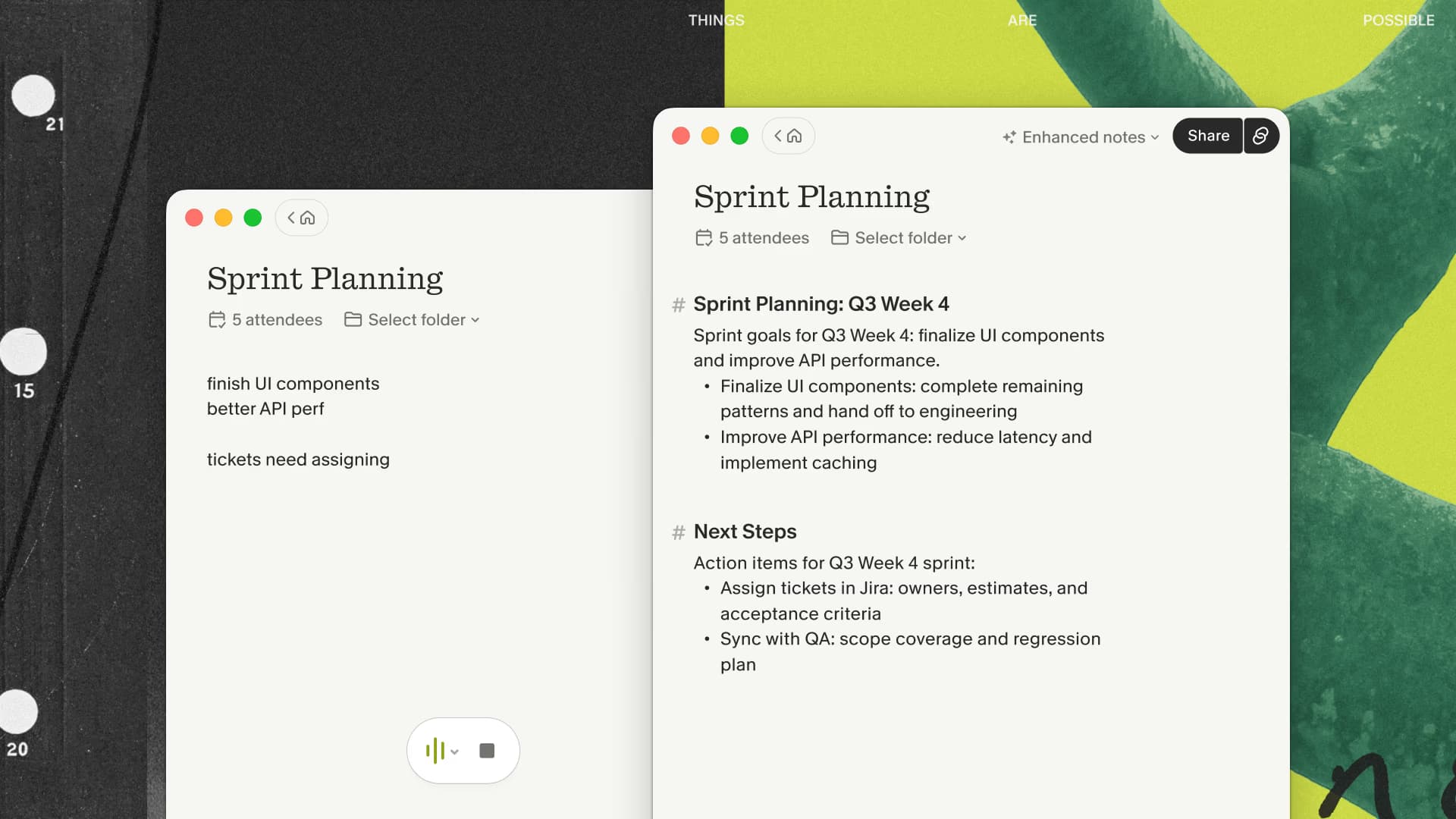
That workflow suits meetings where the durable artifact is a recap, decision log, source note, or follow-up email. Granola has a transcript, folders, Chat, and integrations, but the editor remains the center of gravity. There is no saved audio to replay and no old audio or video file to import.
The limitations are part of the appeal only when they match the job. A researcher who must revisit exact tone, a journalist importing recorded interviews, or a manager reviewing a call may find the missing playback disqualifying.
If you rarely replay meetings and mainly need a recap you can edit and send, run that note-first workflow on one normal call. Time the cleanup afterward; that is the useful comparison with Notta's richer recording surface.
Notta keeps the recording and transcript in the foreground
Notta retains a richer source record. Its product supports live transcription, playback and editing, uploads, speaker labels, summaries, file export, sharing, and integrations. Paid tiers expand recording length, file uploads, AI summaries, translation, collaboration, CRM connections, and video recording. Notta Brain adds ways to turn transcripts into documents and other deliverables.
That breadth is useful when the transcript must be searched, corrected, translated, exported, or tied back to the recording. It is also a better fit for material that already exists as an audio file, video file, or supported link. The tradeoff is a larger surface to configure and a retained recording with its own permissions and deletion policy.
Notta's two capture modes are not interchangeable. Bot-free desktop capture covers meetings the user attends. The calendar bot can attend automatically and can provide participant names from supported platforms. Choose the mode before comparing output quality, because it changes what the product can see and what other participants see.
Multilingual work is Notta's clearest advantage
Notta currently documents 58 languages for monolingual transcription, 42 choices for translation after transcription, 36 source languages for real-time monolingual translation, and 23 languages for bilingual transcription and translation. Exact availability depends on the feature and plan, but this is a much more explicit multilingual product surface than a generic “supports multiple languages” claim.
Granola includes multi-language support and can transcribe meetings in many languages, but Notta is the easier recommendation when live translation, bilingual conversation, subtitle export, or a long language list is a hard requirement. A multilingual team should test its actual language pair, accents, specialized vocabulary, and code-switching rather than relying on the size of the list.
For English-language meetings where the desired output is a concise edited note, the language advantage may not matter. This is why the comparison should begin with the output and meeting shape rather than a raw feature count.
For that narrower English-language use case, compare Granola's finished note with the transcript you would keep in Notta. Choose the artifact you still use a week later.
Privacy and consent depend on the capture mode
Neither product's bot-free desktop mode means that processing is entirely local or that disclosure is optional. Granola captures on the device and streams audio to cloud transcription providers. Notta's bot-free material says the microphone and system channels are routed to its transcription service. A participant may not see either app in the roster, which puts more responsibility on the person operating it to explain what is active.
Notta's bot path is more visible and may post a recording notice when configured. Calendar auto-join can still require host admission and recording permission depending on the platform and settings. Notta tells users to obtain the consent required by their jurisdiction. Granola provides transparency features and similarly leaves the organization responsible for appropriate use.
The retained artifacts differ. Granola keeps the transcript and note but says it does not save the audio. Notta is designed to retain recordings and transcripts for playback and sharing. Before choosing, decide whether replay is necessary, who can access the result, how long it should remain, and what happens when content is copied into another system.
Current plan boundaries
Granola currently lists Basic at $0 per user per month, Business at $14, and Enterprise starting at $35. Basic offers unlimited meetings with limited note history. Business adds unlimited history, advanced models, and advanced integrations. New users who begin through my affiliate link receive their first three months free, which is separate from Granola's public Basic plan.
Notta's current pricing page lists 120 transcription minutes per month on Free, with a three-minute maximum per conversation. Pro raises the allowance to 1,800 minutes and five hours per recording. Business lists unlimited transcription, team features, video recording, and CRM and Zapier integrations. Enterprise begins at 51 seats with customized quotas and additional administrative controls. Notta's dollar amounts are rendered dynamically, so check its current pricing page rather than copying an old review's figures.
The plan comparison follows the workflow. Granola Basic is the easier way to test several complete meetings. Notta Free has enough minutes to inspect the interface but its three-minute conversation cap is a poor simulation of a normal business call. For a serious Notta evaluation, verify the trial or paid tier that covers the meeting length and capture mode you need.
If Granola remains the better fit, my link gives new users the first three months free, so the decision can come from several real meetings rather than a plan-table guess.
Who should choose each product
Choose Granola when you attend your own meetings, want your typed cues to influence an editable draft, and do not need a recording archive. It is a good fit for consultants, founders, product managers, and researchers who want to review a personal note before sharing it. Skip it when file import, unattended attendance, playback, or extensive translation is required.
Choose Notta when saved recordings, live transcripts, imports, translation, exports, or automatic bot attendance are central to the job. Its bot-free desktop mode also makes it a legitimate Granola alternative for Mac and Windows users who dislike meeting bots. Accept that the desktop product is still documented as beta and that a broader system takes more setup.
If both remain plausible, run the same permitted recurring meeting through each desktop app. Use the same headset and type the same two cues. Then score capture reliability, correction time, usefulness of the final note, speaker handling, and whether anyone needed playback. The product that produces the artifact you use a week later wins.

Discussion
Giscus